How to Build a Voice AI Agent in 2026-2027: Pipecat vs LiveKit vs Vapi (Step-by-Step)
Your voice agent works in the demo. Then a real customer calls from an open-plan office.
The agent hears the caller. It also hears the colleague two desks away. It answers both, stops mid-sentence, and the call goes sideways.
If you're:
- building your first voice agent and picking a framework,
- moving a prototype from your laptop to real phone calls,
- or choosing between Pipecat, LiveKit and Vapi,
this guide walks you through all three with the same agent, so you can compare them on code you can actually run.
Short answer: pick Pipecat if you want full control in open-source Python, LiveKit Agents if you want open-source code plus managed WebRTC and telephony, and Vapi if you want a hosted agent you configure instead of code. Whichever you pick, put Krisp voice isolation in front of the agent's ears. All three have a ready-made Krisp integration (on Pipecat, through Pipecat Cloud), and any other pipeline can call Krisp's standalone Voice Isolation API. In my LiveKit test recordings, it cut the words the agent picked up from a background voice from 224 to 35.
How a voice AI agent works
Every voice agent is the same pipeline, whatever framework you use:
- Transport brings the caller's audio in (WebRTC, a phone line, a browser).
- Voice isolation keeps the caller's voice and removes background voices and noise.
- VAD and turn detection decide when the caller is speaking and when they've finished.
- Speech-to-text (STT) turns the audio into words.
- The LLM decides what to say.
- Text-to-speech (TTS) speaks the answer back.
Some agents replace steps 4 to 6 with a single speech-to-speech model, which may also handle step 3. Others merge only part of the pipeline: Deepgram Flux, for example, builds turn detection into speech-to-text. Voice isolation can sit in front of either setup.
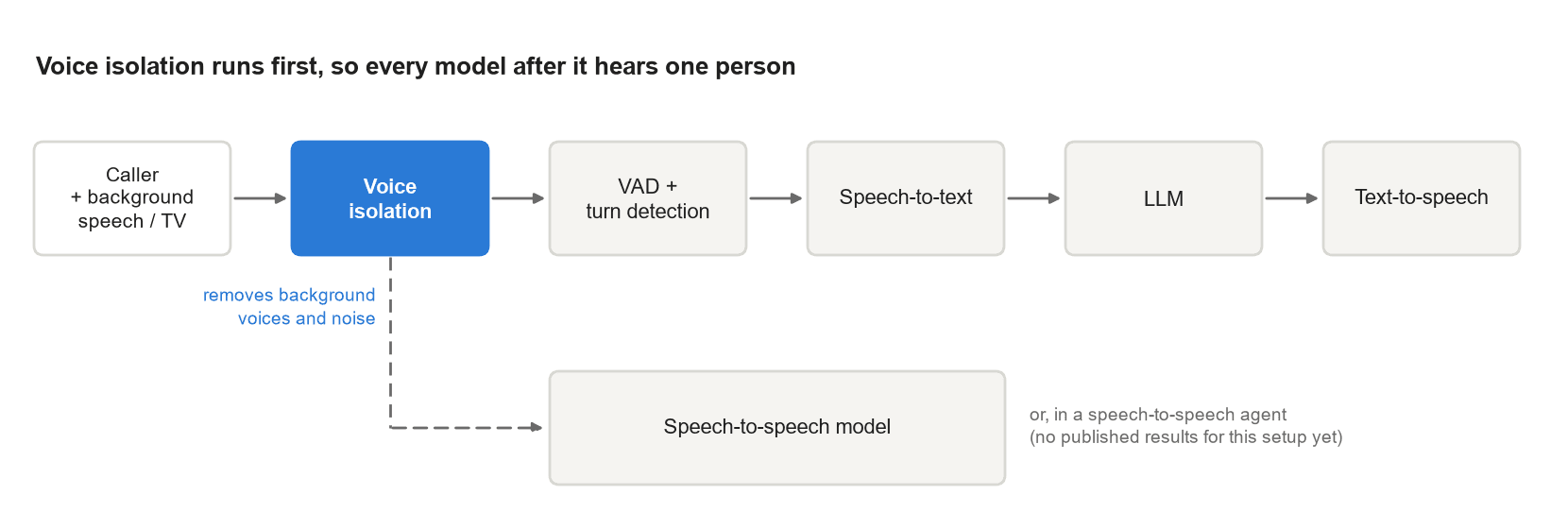
It's also the easiest step to leave out.
That's the step that decides whether the rest of the pipeline is working with the caller's words or with everyone in the room.
Speech-to-text handles noise well now. It still transcribes a second person talking near the mic, and the LLM answers it. In Krisp's test for its Voice Isolation 2.5 release, 10 speech-to-text systems averaged 2.10% word error rate on clean single-speaker audio and 35.92% with a second person talking. With Voice Isolation 2.5 in front, that 35.92% fell to 10.90% (release post).
Pipecat vs LiveKit vs Vapi: which one to pick
The three tools sit at different levels of control:
| Pipecat | LiveKit Agents | Vapi | |
|---|---|---|---|
| What it is | Open-source Python framework for voice and multimodal pipelines | Open-source agent framework on top of LiveKit's WebRTC platform | Hosted voice agent platform |
| You write | The whole pipeline, frame by frame | An agent class and a session config | A JSON assistant config |
| Hosting | Anywhere, or Pipecat Cloud | LiveKit Cloud or self-hosted | Vapi |
| STT / LLM / TTS | Bring your own providers | Your own keys, or LiveKit Inference (no provider keys) | Picked in the config, billed through Vapi |
| Krisp voice isolation | KrispVivaFilter on Pipecat Cloud; Krisp's Voice Isolation API (or a licensed SDK) for local pipelines | krisp.voice_isolation() plugin | Smart Denoising, one config field |
| Best for | Teams that want full control over every frame | Teams that want code plus managed real-time infrastructure | Teams that want an agent live without running servers |
I built the same agent on each one: Ava, a support agent for an online store that answers order-status questions in one or two sentences.
1. Build a voice agent with Pipecat
Pipecat is the most hands-on option. You assemble a pipeline of processors and Pipecat moves audio and text frames through it.
I used pipecat-ai 1.16.0 and OpenAI for all three AI services, so the only key needed is OPENAI_API_KEY.
pip install "pipecat-ai[openai,silero,webrtc,runner]" python-dotenv
import os
from pipecat.audio.vad.silero import SileroVADAnalyzer
from pipecat.frames.frames import LLMRunFrame
from pipecat.pipeline.pipeline import Pipeline
from pipecat.pipeline.runner import PipelineRunner
from pipecat.pipeline.task import PipelineParams, PipelineTask
from pipecat.processors.aggregators.llm_context import LLMContext
from pipecat.processors.aggregators.llm_response_universal import LLMContextAggregatorPair, LLMUserAggregatorParams
from pipecat.runner.types import RunnerArguments
from pipecat.runner.utils import create_transport
from pipecat.services.openai.llm import OpenAILLMService
from pipecat.services.openai.stt import OpenAISTTService
from pipecat.services.openai.tts import OpenAITTSService
from pipecat.transports.base_transport import TransportParams

# Krisp VIVA ships preinstalled on Pipecat Cloud; locally the import fails and the bot runs without it
try:
    from pipecat.audio.filters.krisp_viva_filter import KrispVivaFilter
    krisp_filter = KrispVivaFilter()
except Exception:
    krisp_filter = None

INSTRUCTIONS = ("You are Ava, a support agent for an online store. Keep answers short: one or two sentences, "
                "spoken style. If the caller gives an order number, say it is out for delivery today.")

async def run_bot(transport, runner_args):
    key = os.getenv("OPENAI_API_KEY")
    stt = OpenAISTTService(api_key=key, model="gpt-4o-transcribe")
    llm = OpenAILLMService(api_key=key, model="gpt-4.1-mini",
                           settings=OpenAILLMService.Settings(system_instruction=INSTRUCTIONS))
    tts = OpenAITTSService(api_key=key, model="gpt-4o-mini-tts", voice="alloy")

    context = LLMContext()
    user_agg, assistant_agg = LLMContextAggregatorPair(
        context, user_params=LLMUserAggregatorParams(vad_analyzer=SileroVADAnalyzer()))

    pipeline = Pipeline([transport.input(), stt, user_agg, llm, tts, transport.output(), assistant_agg])
    task = PipelineTask(pipeline, params=PipelineParams(enable_metrics=True))

    @transport.event_handler("on_client_connected")
    async def on_connected(transport, client):
        context.add_message({"role": "developer", "content": "Greet the caller and ask how you can help."})
        await task.queue_frames([LLMRunFrame()])

    await PipelineRunner(handle_sigint=runner_args.handle_sigint).run(task)

async def bot(runner_args: RunnerArguments):
    params = lambda: TransportParams(audio_in_enabled=True, audio_out_enabled=True, audio_in_filter=krisp_filter)
    transport = await create_transport(runner_args, {"daily": params, "webrtc": params})
    await run_bot(transport, runner_args)

if __name__ == "__main__":
    from pipecat.runner.run import main
    main()
Run python bot.py and open http://localhost:7860/client. Pipecat serves a small playground where you connect and talk to the bot over WebRTC, with no account needed. Mine greeted me, and when I sent "Hi, my order number is 4471. Where is it?" it answered "Your order 4471 is out for delivery today."
Adding Krisp. The KrispVivaFilter goes in audio_in_filter, so it cleans the caller's audio before VAD and STT ever see it. Its dependencies come preinstalled on Pipecat Cloud (base image 0.1.8 or later), and you turn it on when you deploy:
pipecat cloud deploy --krisp-viva-audio-filter tel
Pick tel (models up to 16 kHz, suited to phone audio) or pro (up to 32 kHz). According to Pipecat's docs, the first 10,000 Krisp minutes per month are free, then $0.0015 per minute.
Running KrispVivaFilter outside Pipecat Cloud needs a commercial VIVA SDK license. For local development there's a simpler route: Krisp's self-serve Voice Isolation API. Any pipeline that can open a WebSocket can call it, so you send the caller's audio and feed the cleaned audio into VAD and STT. New accounts start with $30 in free credits. It's a separate integration, not the KrispVivaFilter above. I didn't deploy to Pipecat Cloud for this guide, so my measured Krisp results come from LiveKit below.
Pros
- Full control over every processor in the pipeline.
- Open source, runs anywhere Python runs.
- Krisp VIVA preinstalled on Pipecat Cloud, one deploy flag to enable.
Cons
- More code to own than the other two.
- The built-in
KrispVivaFilterneeds Pipecat Cloud; locally you call Krisp's Voice Isolation API instead (or use a licensed SDK).
Best for: teams that want to own the pipeline end to end.
2. Build a voice agent with LiveKit Agents
LiveKit Agents gives you an open-source agent framework on top of LiveKit's real-time platform. Your agent joins a "room" like any other participant, and LiveKit handles WebRTC and telephony.
I used livekit-agents 1.8.13 with LiveKit Inference, so the only credentials are the LiveKit Cloud project URL, key and secret. STT, LLM and TTS are billed through LiveKit, with no provider keys.
pip install "livekit-agents[silero,turn-detector]" livekit-plugins-krisp python-dotenv
from livekit import agents
from livekit.agents import Agent, AgentSession, inference, room_io
from livekit.plugins import krisp, silero

INSTRUCTIONS = """You are Ava, a support agent for an online store.
Keep answers short: one or two sentences, spoken style.
If the caller gives an order number, say it is out for delivery today."""

class SupportAgent(Agent):
    def __init__(self) -> None:
        super().__init__(instructions=INSTRUCTIONS)

async def entrypoint(ctx: agents.JobContext) -> None:
    session = AgentSession(
        stt="deepgram/nova-3",          # LiveKit Inference model IDs
        llm="openai/gpt-4.1-mini",
        tts="cartesia/sonic-3",
        vad=silero.VAD.load(),
        turn_detection=inference.TurnDetector(),
    )
    await session.start(
        room=ctx.room,
        agent=SupportAgent(),
        room_options=room_io.RoomOptions(
            audio_input=room_io.AudioInputOptions(
                # Krisp voice isolation before VAD, turn detection and STT
                noise_cancellation=krisp.voice_isolation(noise_suppression_level=100),
            ),
        ),
    )
    await session.generate_reply(instructions="Greet the caller and ask how you can help.")

if __name__ == "__main__":
    agents.cli.run_app(agents.WorkerOptions(entrypoint_fnc=entrypoint))
python agent.py download-files   # once: VAD and turn-detector weights
python agent.py dev              # registers the agent with LiveKit Cloud
The Krisp plugin needs no Krisp account and no model files: it authenticates through your LiveKit Cloud project. LiveKit's free Build plan includes 100 voice-isolation minutes, then $0.0012 per minute on paid plans (pricing). For SIP phone calls, use krisp.voice_isolation_telephony() instead.
One setting matters more than it looks. LiveKit's plugin defaults to noise_suppression_level=75. That's LiveKit's default, not Krisp's: Krisp's own default is full strength (100). In my four test recordings below, going from LiveKit's default to 100 roughly halved the word error rate again.
Pros
- Open-source code with managed WebRTC and telephony.
- LiveKit Inference: one account instead of three provider keys.
- Krisp plugin works out of the box with a LiveKit Cloud project.
Cons
- The Krisp plugin needs LiveKit Cloud for real-time transport, unless you hold your own Krisp license.
- On Windows,
devmode didn't reload my code changes; I had to restart the worker.
Best for: teams that want to write the agent in code but not run real-time media servers.
3. Build a voice agent with Vapi
Vapi is the no-servers option. An agent is a JSON "assistant" config, and Vapi runs the whole pipeline.
import os
import requests

assistant = {
    "name": "Ava - store support",
    "firstMessage": "Hi, this is Ava from the store. How can I help you today?",
    "transcriber": {"provider": "deepgram", "model": "nova-3", "language": "en"},
    "model": {
        "provider": "openai",
        "model": "gpt-4.1-mini",
        "messages": [{"role": "system", "content": "You are Ava, a support agent for an online store. "
                      "Keep answers short. If the caller gives an order number, say it is out for delivery today."}],
    },
    "voice": {"provider": "vapi", "voiceId": "Elliot"},
    # Smart Denoising uses Krisp to remove background voices and noise
    "backgroundSpeechDenoisingPlan": {"smartDenoisingPlan": {"enabled": True}},
}

r = requests.post("https://api.vapi.ai/assistant",
                  headers={"Authorization": f"Bearer {os.environ['VAPI_API_KEY']}"},
                  json=assistant, timeout=30)
print(r.status_code, r.json()["id"])
Vapi answered 201 with the new assistant ID, and the response echoed "smartDenoisingPlan": {"enabled": true}. To call it from a web page, Vapi provides the @vapi-ai/web SDK, which uses your public key.
Vapi's docs describe Smart Denoising as Krisp's technology for removing background voices and noise in real time (docs). It replaces the older backgroundDenoisingEnabled flag.
Pros
- No servers: an agent is one API call.
- Krisp voice isolation is one config field.
- Transcriber, model and voice configured in the same request.
Cons
- Less control over the pipeline than code-first frameworks.
- Model, voice and transcriber usage is billed through Vapi by default.
Best for: teams that want a hosted agent without running infrastructure.
Test your agent like a real call
A voice agent that works on your laptop mic proves very little. Real calls have other people in them.
So I tested the LiveKit agent the way a real call would hit it. A small script joins the room as the caller and plays a real recording into the agent at real-time pace: four recordings from Krisp's open Voice Isolation Benchmark Dataset, two from working call centers and two from home and office settings, each with a second person talking. Then I captured what the agent's speech-to-text actually heard and compared it with the dataset's hand-written transcripts.
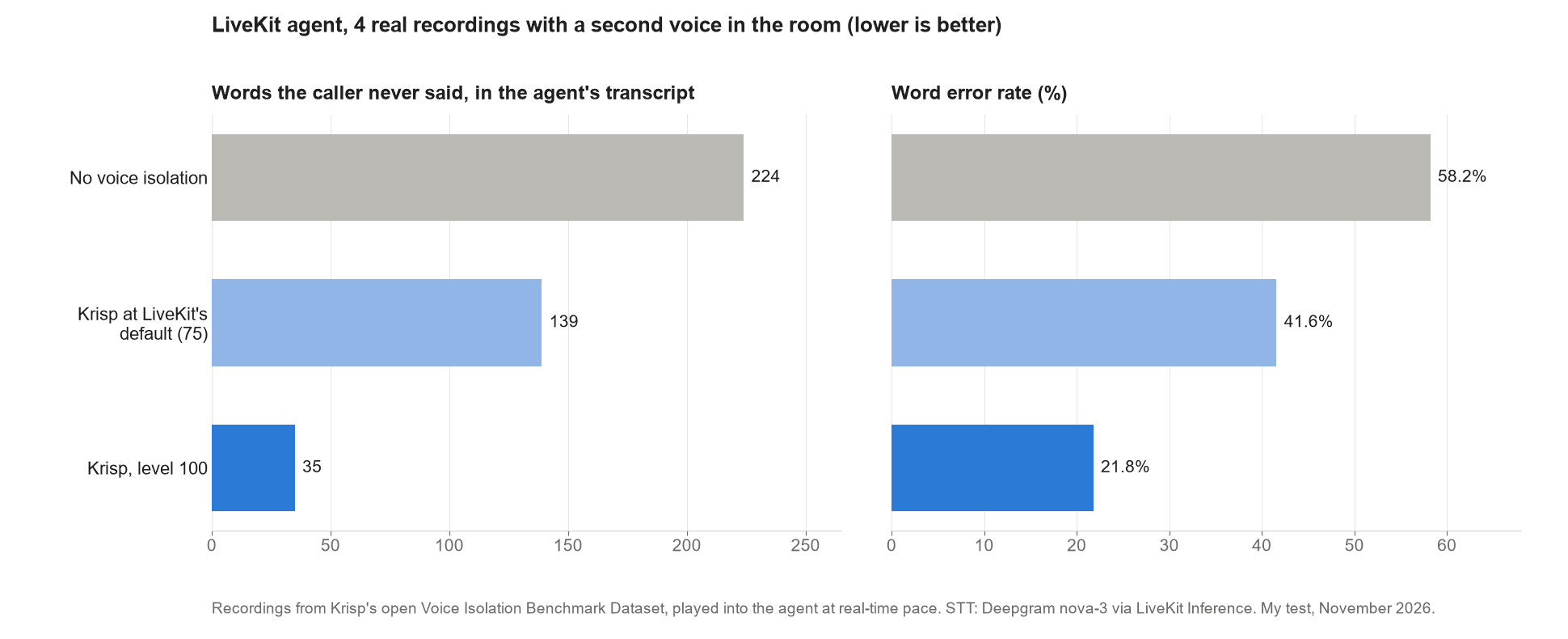
| Agent input | Word error rate | Extra words in the transcript |
|---|---|---|
| No voice isolation | 58.2% | 224 |
| Krisp at LiveKit's default (75) | 41.6% | 139 |
| Krisp, level 100 | 21.8% | 35 |
Same LiveKit agent, same four recordings, Deepgram nova-3 through LiveKit Inference. "Extra words" are insertions against the main speaker's transcript, mostly from the background voice. One run per setting, so treat small differences between files as noise.
Without voice isolation, the agent's transcript picked up 224 words the caller never said. With Krisp at level 100, 35. On one office recording, the extra words went from 43 to zero.
That's the gap between an agent that answers the caller and one that answers the room.
Krisp's open voice isolation benchmark points the same way at a bigger scale: across 265 recordings and 11 speech-to-text configurations, word error rate fell from 23.24% to 6.24% with Voice Isolation 2.5.
My relative drop (58.2% to 21.8%, about 63% fewer errors) is almost the same as Deepgram Nova-3 streaming in Krisp's benchmark (20.4% to 8.0%, 61% fewer). My absolute numbers are higher, likely from the scoring and the small sample, but the two results agree.
Going multilingual with Krisp's Voice Translation API
Once the agent hears the right person, the next wall is language. Krisp's voice translation API does real-time speech-to-speech translation across 61 languages, with background voice cancellation built in. Each session translates one direction (I tested English to Spanish); for a two-way call you run one session per direction.
It's a WebSocket: you get a short-lived session key with your Krisp API key, send one config message, then stream 16 kHz PCM.
import asyncio, json, os, requests, websockets

def session_key():
    r = requests.post("https://api.developers.krisp.ai/v2/sdk/tokens/session",
                      headers={"Authorization": f"api-key {os.environ['KRISP_API_KEY']}"},
                      json={"usage_type": "vt", "expiration_ttl": 30})
    return r.json()["data"]["session_key"]

async def translate(pcm_chunks):
    url = "wss://streaming.krisp.ai/vt?authorization=" + requests.utils.quote(f"Api-Key {session_key()}")
    async with websockets.connect(url, max_size=None) as ws:
        await ws.send(json.dumps({"config": {
            "audio": {"format": "pcm_s16le", "sample_rate": 16000, "channels": 1},
            "source_language": "en-US", "target_language": "es-ES", "voice": "female",
            "transcript": {"interim": False, "final": True, "translate": True},
            "features": {"background_voice_cancellation": True},
        }}))
        # stream 20 ms chunks with ws.send(chunk); translated audio comes back as binary frames,
        # transcripts and translations as JSON events
I streamed 30 seconds of a real call-center recording through it. It sent back 29.3 seconds of Spanish speech plus both transcripts, for example:
"Thank you, Lilith. Your account 4471-B reflects usage of 512 kW per hour this cycle." "Gracias, Lilith. Su cuenta 4471-B refleja un consumo de 512 kW por hora en este ciclo."
One gotcha: URL-encode the authorization value. The space in Api-Key <key> made my first handshake fail with HTTP 400.
Production checklist
Before your agent takes real calls:
- Isolate the caller's voice at the start of the pipeline, and check the level: in my four test recordings,
noise_suppression_level=100cut errors sharply compared with LiveKit's default (75). Krisp's own default is full strength (100). Measure it on your own audio. - Use the telephony model for phone calls:
voice_isolation_telephony()on LiveKit,telon Pipecat Cloud. - Budget for latency. Krisp voice isolation adds no more than 20 ms, 15 ms of it algorithmic latency; through the SDK, plan for about 25 ms. If you call the WebSocket API, add network time on top.
- Test with real recordings from calls, homes and offices, not your own mic in a quiet room. A second voice is the case that breaks agents.
- Watch turn-taking and interruptions. Krisp also ships Turn-Taking and Interrupt Prediction models in its VIVA SDK for teams that run their own pipeline.
- Load secrets explicitly. An old
OPENAI_API_KEYin my Windows environment silently overrode my.envand returned 401s until I usedload_dotenv(override=True).
FAQ
How do I build a voice AI agent?
Pick a framework (Pipecat, LiveKit Agents or Vapi), connect a transport, add voice isolation, VAD and turn detection, then speech-to-text, an LLM and text-to-speech. All three frameworks in this guide get a basic agent running in under 100 lines of code or one API call.
Pipecat vs LiveKit: which is better?
Neither is better in general. Pipecat gives you full control of the pipeline in open-source Python. LiveKit Agents gives you open-source agent code plus managed WebRTC and telephony. Pick Pipecat for control, LiveKit for infrastructure you don't want to run.
LiveKit vs Vapi: what's the difference?
LiveKit Agents is code: you write the agent and LiveKit runs the real-time transport. Vapi is a hosted platform: you send a JSON config and Vapi runs everything. Vapi is faster to start; LiveKit gives you more control.
Do Pipecat, LiveKit and Vapi support Krisp?
Yes. Pipecat has KrispVivaFilter, preinstalled on Pipecat Cloud; for local development, call Krisp's Voice Isolation API over a WebSocket. LiveKit has the livekit-plugins-krisp plugin with krisp.voice_isolation(). Vapi's Smart Denoising uses Krisp, enabled with backgroundSpeechDenoisingPlan.smartDenoisingPlan.enabled.
Why does my voice agent stop mid-sentence or answer things the caller didn't say?
Usually because it hears more than the caller: a colleague, a TV, another agent on a call-center floor. The agent takes that voice for the caller cutting in and stops mid-sentence, and speech-to-text transcribes its words too. Voice isolation before VAD and STT removes it; in my tests it cut the extra words in the transcript from 224 to 35.
Can a voice agent handle callers in other languages?
Yes. Krisp's voice translation API translates speech to speech in real time across 61 languages. Each session handles one direction, so a two-way call uses two sessions.
The takeaway
Getting a basic voice agent running is the easy part on any of these three frameworks.
Making it hear the right person on a real call is the part that's easy to skip. It's a ready-made integration on all three, and one API call for any other pipeline.
If you're a software or API company looking to explain your product through high-quality educational content (not marketing fluff), feel free to connect with me on LinkedIn.