Give Claude Code a Cloud Browser: Browser Use MCP Setup in 5 Minutes
Claude Code can write a scraper in thirty seconds.
It still can't open the page.
Ask it to check a pricing page, read an npm package or pull numbers from a dashboard, and you get one of three outcomes: it fetches raw HTML and misses everything rendered by JavaScript, it gets a 403 from bot protection, or it asks you to paste the content yourself.
If you're:
- using Claude Code or Cursor for real work, not demos,
- building agents that need live data from websites without an API,
- or tired of copy-pasting pages into your terminal,
This setup is for you.
The Browser Use MCP server gives Claude Code a cloud browser with its own agent. One command to install, and Claude can send it tasks like "open this page and return these four fields as JSON". I installed it, ran it on a page that had just blocked a plain fetch with a 403, and recorded what every session cost. All numbers below come from my runs on November 18, 2026, with Claude Code 2.1.216.
TL;DR
- Install: one
claude mcp addcommand with your API key. Put the-Hheader after the URL, or the command fails- What you get: 7 tools that start a cloud browser agent, poll it, send follow-up tasks and stop it
- Result: Claude Code read an npm page that returned 403 to a plain fetch, and got clean structured data back
- Cost: $0.105 to $0.111 per session in my tests, with the agent's model at 82 to 85% of it. Proxy and browser time are itemized in every response
Your browser vs a cloud browser
Claude Code already has ways to browse. The desktop app has a built-in browser, and Claude in Chrome drives the Chrome you have open.
Those are great when the task needs your session: your logins, your tabs, the app you're debugging on localhost.
A cloud browser solves different problems:
- It isn't your machine. Nothing runs in your Chrome, and closing your laptop doesn't kill the task.
- It doesn't look like a bot. Browser Use runs stealth browsers behind residential proxies, so pages that block plain requests often load, like the npm page later in this article.
- It scales. New Browser Use projects start with 10 concurrent browsers, so you can fan out tasks instead of queueing them on one Chrome window.
Use your own browser for things that need you. Use a cloud browser for everything else.
Hosted or local: pick the right Browser Use MCP
Browser Use ships two different MCP servers, and the docs cover both. They solve different problems:
| Hosted MCP | Local MCP | |
|---|---|---|
| Runs | On Browser Use's servers | On your machine (uvx) |
| Endpoint | https://api.browser-use.com/v3/mcp | uvx --from browser-use==1.0.6 browser-use --cli-mcp |
| Who drives the browser | Browser Use's own agent | Your client's model writes Python against browser helpers |
| Browser | Cloud browser, proxy included | Your Chrome, or a cloud browser on request |
| Tools | 7 (sessions, follow-ups, profiles) | 4 (browser_exec, browser_screenshot, browser_login, browser_feedback) |
This tutorial uses the hosted server. You send a task in plain English and get the answer back, and Claude Code doesn't spend its own tokens clicking around a page step by step.
👉 You'll need a Browser Use Cloud API key. Create one here. Signing up gives you a $1 credit, which covers a handful of sessions like the ones below.
Step 1: Add the MCP server to Claude Code
The Browser Use docs give this command:
claude mcp add -t http -H "Authorization: Bearer YOUR_API_KEY" browser-use https://api.browser-use.com/v3/mcp
On Claude Code 2.1.216 it fails with error: missing required argument 'name'.
The reason is in claude mcp add --help: the header flag is -H, --header <header...>, and the ... means it takes several values. Placed first, it swallows browser-use and the URL as if they were extra headers. Put the header last:
claude mcp add -t http browser-use https://api.browser-use.com/v3/mcp -H "Authorization: Bearer YOUR_API_KEY"
On Windows PowerShell 5.1, && doesn't work either, so chain commands with ; if you build this into a script.
By default the server is added in local scope: it only exists for the project folder you ran the command in. Add -s user to make it available everywhere.
Check that it connected:
claude mcp get browser-use
browser-use:
  Scope: Local config (private to you in this project)
  Status: ✔ Connected
  Type: http
  URL: https://api.browser-use.com/v3/mcp
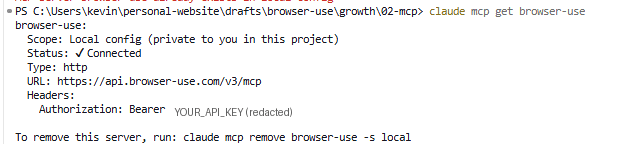
One warning: claude mcp get prints the Authorization header with your full API key. Crop or blur it before you share a screenshot of that terminal.
Step 2: Know the 7 tools
I asked the server for its tool list directly. It identifies itself as browser-use-v3-agent version 3.0.0 and exposes:
run_session: start a cloud browser agent on a task. Optional:model,output_schema,keep_alive,profile_id,workspace_id,proxy_countryget_session: poll status and output, including the cost breakdownsend_task: send a follow-up task to a session that's still aliveget_session_messages: see what the agent did, step by stepstop_session: stop the current task or destroy the whole sessionlist_sessions: recent sessions with status and costlist_browser_profiles: saved browser profiles for sites that need a login
Two details matter before you use it.
The hosted MCP runs Browser Use's V3 sessions, not the newer V4 runs used by the API and the n8n node. The docs say so directly. In practice it means the session model: sessions can stay alive and take follow-up tasks.
run_session accepts 11 models, from gemini-3-flash and gpt-5.4-mini to claude-sonnet-5 and claude-opus-4.8. Leave model empty and Browser Use picks one for your account. Mine got claude-sonnet-5.
Step 3: Run a real task from Claude Code
I picked a page that had just failed for me. While researching this article, a plain fetch of the npm page for Browser Use's n8n node came back with HTTP 403.
So I asked Claude Code:
Use the browser-use MCP server. Run a session that opens
https://www.npmjs.com/package/n8n-nodes-browser-use-cloud and returns,
as structured output with the schema {version, weekly_downloads,
last_publish, license}, the package's current version, weekly downloads,
last publish date and license. Poll get_session until it finishes.
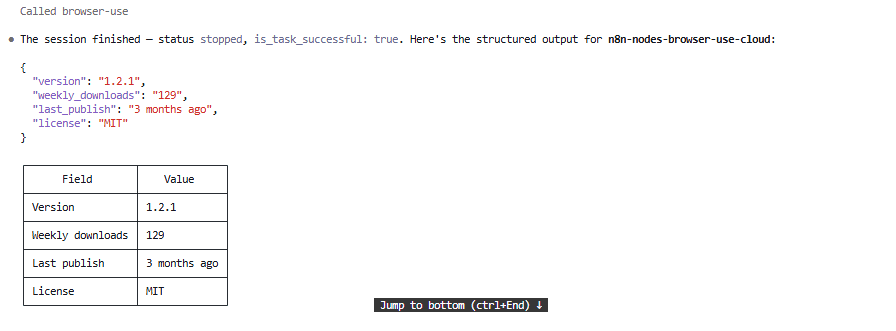
Claude Code called run_session with the schema, polled get_session, and answered:
| Field | Value |
|---|---|
| Version | 1.2.1 |
| Weekly downloads | 129 |
| Last publish | 3 months ago |
| License | MIT |
The version matches what n8n showed me when I installed the node from its panel, so the agent read the real page.
Here's the session as get_session returned it, cut to the useful fields:
{
  "status": "stopped",
  "model": "claude-sonnet-5",
  "output": {"version": "1.2.1", "weekly_downloads": "129",
             "last_publish": "3 months ago", "license": "MIT"},
  "step_count": 6,
  "is_task_successful": true,
  "llm_cost_usd": 0.091479,
  "proxy_cost_usd": 0.019186646677553654,
  "browser_cost_usd": 0.0003333333333333333,
  "total_cost_usd": 0.11099898001088698
}
Six steps, about 38 seconds between creation and the last update, and $0.111 in total.
Step 4: Keep the session alive for follow-ups
Opening a new browser for every question is wasteful when the questions are related. Set keep_alive: true and the session stays idle after the first task, ready for send_task.
I tested it by calling the same MCP tools from a short script, so Claude Code's own tokens weren't part of the measurement:
run_sessionwithmodel: "gemini-3-flash",keep_alive: trueand the same npm task. Idle after 21.6 seconds with the same four fields.send_taskon the same session: "Now open the GitHub repository linked from that npm page and return its star count and the date of the latest commit."- The agent followed the link to
github.com/browser-use/n8n-nodes-browser-useand returned 49 stars and a latest commit on August 29, 2026, in 47.5 seconds.
Fourteen steps across both tasks, $0.105 in total. One browser, one proxy session, two answers.
If you leave keep_alive on, call stop_session with strategy: "session" when you're done. Otherwise the browser waits for the next task.
What it costs
Every get_session response itemizes the bill, which makes the cost easy to reason about:
| Session | Model | Steps | LLM | Proxy | Browser | Total |
|---|---|---|---|---|---|---|
| npm page (from Claude Code) | claude-sonnet-5 | 6 | $0.0915 | $0.0192 | $0.0003 | $0.1110 |
| npm page + GitHub follow-up | gemini-3-flash | 14 | $0.0896 | $0.0151 | $0.0003 | $0.1050 |
Three things stood out:
- The model is most of the bill. About 82 to 85% in both sessions. Browser time was about one-thirtieth of a cent.
- Read the cost after the session closes. The first
get_sessionClaude Code saw reported $0.1027 in total. Read again after the session stopped, the proxy line had grown and the total settled at $0.1110. - Claude Code's own tokens are separate. Orchestrating the run took Claude Code 11 turns. On a Claude subscription that's part of your plan; on API billing it's charged on top of the Browser Use session.
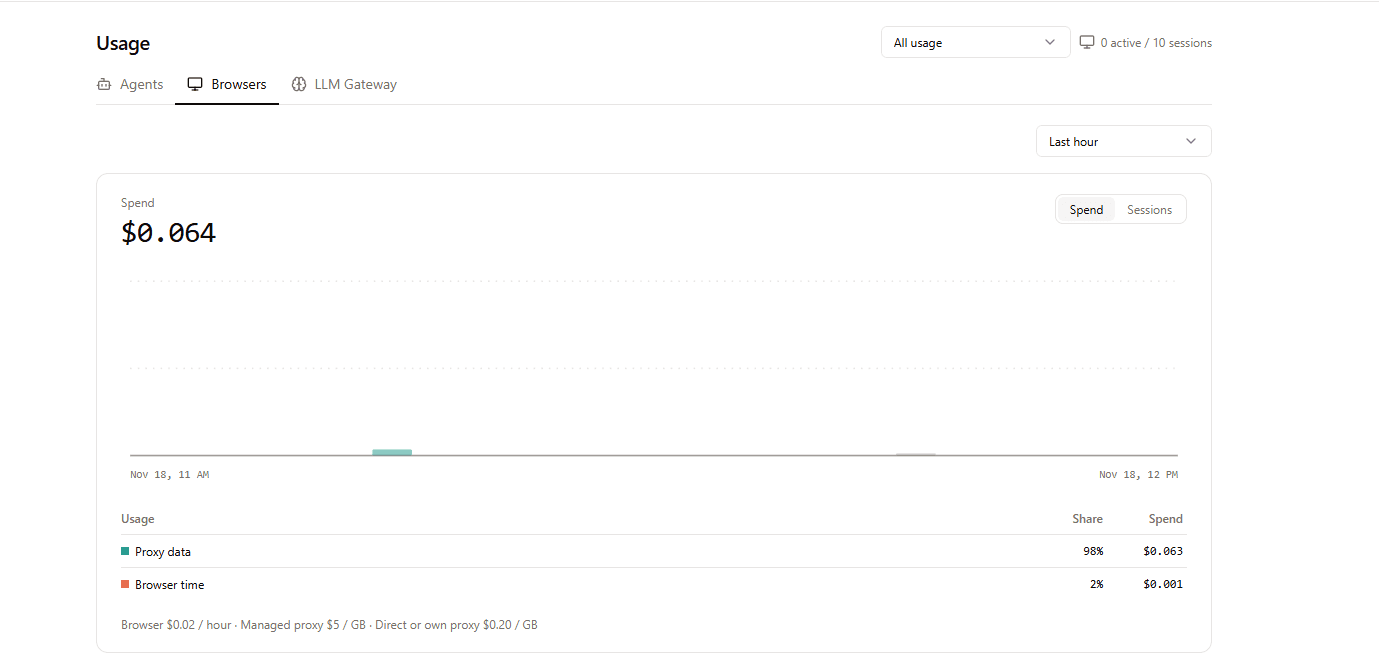
The Browser Use dashboard tells the same story from the other side. Its Browsers tab for the hour of my tests, which covered three sessions (the two above plus the interactive run in the Step 3 screenshot), showed $0.064 of browser spend, 98% of it proxy data:
Cursor, Windsurf and Codex
I tested the hosted server in Claude Code only. The configs below come from the Browser Use MCP docs. I haven't run them myself.
Cursor (.cursor/mcp.json):
{
  "mcpServers": {
    "browser-use": {
      "url": "https://api.browser-use.com/v3/mcp",
      "headers": { "Authorization": "Bearer YOUR_API_KEY" }
    }
  }
}
Windsurf (~/.codeium/windsurf/mcp_config.json): the same block, with serverUrl instead of url.
Codex (~/.codex/config.toml): the docs only list the local server:
[mcp_servers.browser-use]
command = "uvx"
args = ["--from", "browser-use==1.0.6", "browser-use", "--cli-mcp"]
Keep the ==1.0.6 pin. The docs warn that browser-use moves fast and an unpinned release can break the setup.
Common problems
error: missing required argument 'name'. Your-Hheader comes before the server name. Move it to the end of the command.- The server shows as disconnected. Run
claude mcp get browser-usefrom the same folder where you added it. Local scope is per project. - The total cost changed after the task ended. Proxy usage settles after the session stops. Read
get_sessionagain for the final number. - You need to be logged in on the target site. Use
list_browser_profilesand pass aprofile_idtorun_session. Profiles keep logins between sessions.
FAQ
What is the Browser Use MCP server?
It's an MCP server that lets AI tools like Claude Code, Cursor and Windsurf start Browser Use's cloud browser agent. The hosted version lives at https://api.browser-use.com/v3/mcp and exposes 7 tools, from run_session to list_browser_profiles.
Is the Browser Use MCP free?
Connecting the server costs nothing, but every session is billed to your Browser Use Cloud account: the agent's model, proxy traffic and browser time. My two sessions cost $0.105 and $0.111. New accounts get a $1 credit.
What's the difference between the hosted and the local Browser Use MCP?
The hosted server runs Browser Use's own agent in the cloud: you send a task and get the result back. The local server (uvx --from browser-use==1.0.6 browser-use --cli-mcp) gives your client's model direct control of a browser through Python helpers, with no agent of its own.
Why does claude mcp add fail with "missing required argument 'name'"?
Because -H takes several values and swallows the server name and the URL when it comes first. Put the header at the end: claude mcp add -t http browser-use https://api.browser-use.com/v3/mcp -H "Authorization: Bearer YOUR_API_KEY".
Does the Browser Use MCP work with Cursor?
According to the Browser Use docs, yes: add the server to .cursor/mcp.json with the URL and an Authorization header. I only tested it in Claude Code.
Can the agent log in to websites?
Yes, through browser profiles. list_browser_profiles returns the saved profiles, and you pass a profile_id to run_session so the session uses the stored login.
Key takeaways
- One command gives Claude Code a stealth cloud browser with its own agent. Put the header flag last.
- Ask for an
output_schemaand Claude Code gets JSON back, not a wall of page text. - A session cost about 11 cents in my tests, mostly the agent's model.
get_sessionshows the split, so check it after the session stops.
From here you can build
With the server installed, any Claude Code session can:
- check competitor pricing pages before you write a comparison,
- verify a package, a changelog or a status page that blocks plain requests,
- keep one session open and walk through a multi-page flow with
send_task.
If you'd rather run browser agents on a schedule instead of on request, I built the same kind of workflow without code in How to Build a Browser Agent in n8n with Browser Use. And if you're still choosing a provider, start with my Browser Use review.
Claude Code already knew what to do with the data.
Now it can go and read the page.
Looking for technical content for your company? I can help — LinkedIn · kevinmenesesgonzalez@gmail.com