Browser Use Review: I Tested Its Cloud Browser and AI Agents
Most browser automation demos work.
Until a real website looks at them.
Run Playwright on your laptop, open a bot-detection page, and you get flagged in seconds. Then you start adding stealth plugins, proxies and retries, and suddenly the "quick script" is an infrastructure project.
If you're:
- building AI agents that need to browse the web,
- moving Playwright or Puppeteer scripts to the cloud,
- or deciding whether to buy browser infrastructure instead of building it,
This Browser Use review is for you.
In my comparison of the best browser automation APIs for AI agents, I ranked Browser Use #1. This is the hands-on follow-up: I took its two products, the cloud browser and the hosted agent, and ran them against real pages and tasks I could verify.
Every number, screenshot and cost below comes from my own runs on October 30 and November 2, 2026.
TL;DR
- Stealth: local headless Chrome was flagged as "Robot" on BrowserScan; the Browser Use cloud browser came back "Normal", with no stealth plugins
- Speed: 10 out of 10 cloud browsers were ready in under a second (median 0.29 s)
- Agents: 3 out of 3 verifiable tasks right with every model I tried, including 11/11 structured records;
bu-ultrafastwas the fastest andbu-fastthe cheapest- Cost: under one cent for a typical run; residential proxy traffic, not the model, drives the bill
Why "it works on my machine" isn't enough
A browser agent has two jobs, and most setups only solve one.
The first job is getting through. Websites check dozens of signals before they trust a browser: the navigator.webdriver flag, the user agent, plugins, the IP address. A default headless Chrome fails several of them.
The second job is finishing the task. Someone has to turn "find the latest release of this repo" into clicks, scrolling and a clean answer.
Do it yourself and you're maintaining:
- a stealth layer that breaks with every Chrome update
- a proxy pool and its billing
- an agent loop with retries, timeouts and parsing
None of that is your product.
What Browser Use Cloud actually gives you
Browser Use started as an open-source browser agent library (119k GitHub stars, MIT licence). Browser Use Cloud is the managed version, and it ships two products on the same API:
- Browser Infrastructure: a stealth cloud browser. You get a CDP URL and connect your own Playwright or Puppeteer code to it.
- Browser Use Agents: you send a task in plain English and get the result back. The agent loop, the browser and the retries run on their side.
Pricing is pay-as-you-go: $0.02 per browser hour, $5/GB for residential proxy traffic, and for agents the model's token price plus 20%. New accounts get $1 of free credit.
I tested both products, plus the bill.
👉 You can create an account at browser-use.com and follow along.
Setup in two commands
pip install --upgrade browser-use-sdk playwright
python -m playwright install chromium
Create an API key in the dashboard and export it. The SDK reads it from the environment:
export BROWSER_USE_API_KEY=bu_...
Test 1: The cloud browser vs. local headless Chrome
The first question is simple: does a Browser Use browser look less like a bot than the Chromium Playwright launches on my laptop?
Here's the whole connection code. Browser Use gives you a CDP URL, and Playwright attaches to it with one line:
from browser_use_sdk.v4 import BrowserUse
from playwright.sync_api import sync_playwright

with BrowserUse() as client:
    session = client.browsers.create(proxy_country_code="us")
    try:
        with sync_playwright() as p:
            browser = p.chromium.connect_over_cdp(session.cdp_url)
            context = browser.contexts[0]
            page = context.pages[0] if context.pages else context.new_page()

            page.goto("https://www.browserscan.net/bot-detection")
            page.wait_for_timeout(8000)
            page.screenshot(path="cloud-browserscan.png")
    finally:
        client.browsers.stop(session.id)  # closing Playwright does NOT stop the cloud browser
That finally matters. Disconnecting Playwright leaves the managed browser running (and billing) until you call stop().
I ran the same pages with a plain p.chromium.launch(headless=True) locally, then compared.
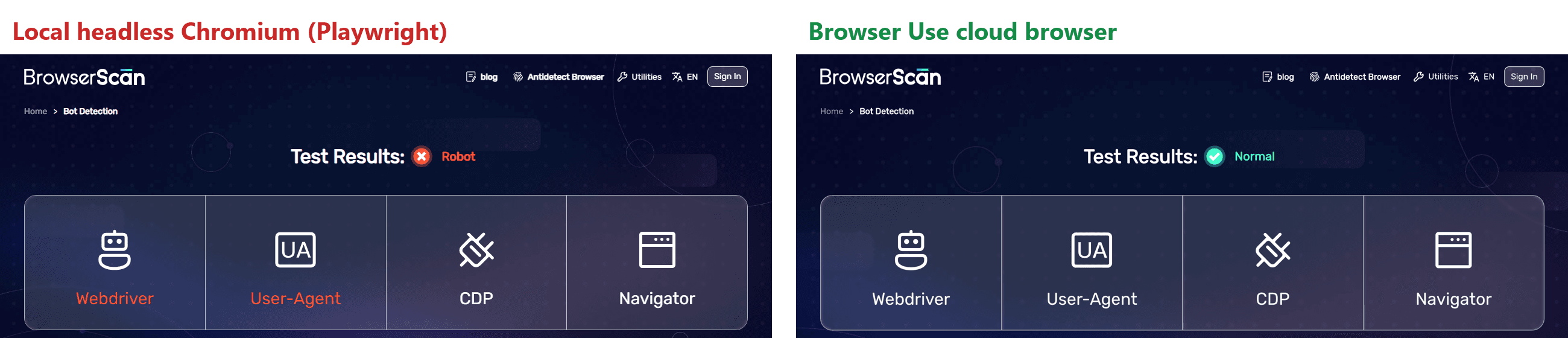
BrowserScan: local headless Chromium was flagged as Robot (Webdriver and User-Agent failed). The Browser Use browser came back Normal, with all four checks passing.
Sannysoft's fingerprint test told the same story:
| Check | Local headless Chromium | Browser Use cloud browser |
|---|---|---|
| WebDriver | present (failed) | missing (passed) |
| Chrome object | missing (failed) | present (passed) |
| Plugins | 0 | 5 |
| User agent | HeadlessChrome/153 | regular Chrome 154 on macOS |
| WebGL renderer | SwiftShader (software) | Apple M3 Pro (Metal) |
| IP | my home ISP in Spain | Charter Communications, New York |
The last row is the residential proxy. I asked for "us" and got a consumer ISP address, not a datacenter range.
A fair caveat: two detection pages are a sanity check, not a benchmark. For scale, Browser Use publishes its own Stealth Bench (100 bot-protected sites, two visits each), where its cloud got through on 90.5% of visits versus 73.5%–82% for other providers (Anchor, Kernel, Browserbase, Browserless, Steel and Hyperbrowser). That's their benchmark, run on sites they selected; my test only confirms the basics hold up from the outside.
Cold starts: under a second, every time
Agents open and close browsers constantly, so startup time adds up. I created 10 browsers and timed browsers.create() from my laptop in Spain:
| Mode | Runs | Median | Slowest |
|---|---|---|---|
| One after another | 5 | 0.29 s | 0.75 s |
| 5 in parallel | 5 | 0.73 s | 0.76 s |
Every single one was ready in under a second, which matches the "subsecond cold starts" claim. Connecting Playwright over CDP added about 1.7 s on the first session.
Billing was exactly as advertised: a 57-second session cost $0.00033 (one minute at $0.02/hour).
Test 2: Hosted agents on three tasks I could verify
The browser is half the product. The other half is not writing the automation at all.
I gave the hosted agent three tasks, each with an answer I could check independently:
- "Find the top Hacker News story" (the docs' own example)
- Every book in the Travel category of books.toscrape.com, with title, price and star rating, returned as JSON
- The star count and latest release of the
browser-use/browser-useGitHub repo
The structured one is the interesting one. You pass a JSON schema, and the result comes back as data instead of prose:
from browser_use_sdk.v4 import BrowserUse

BOOK_SCHEMA = {
    "type": "object",
    "properties": {
        "books": {
            "type": "array",
            "items": {
                "type": "object",
                "properties": {
                    "title": {"type": "string"},
                    "price_gbp": {"type": "number"},
                    "rating": {"type": "integer", "description": "Star rating 1-5"},
                },
                "required": ["title", "price_gbp", "rating"],
            },
        }
    },
    "required": ["books"],
}

with BrowserUse() as client:
    run = client.runs.create(
        "Go to https://books.toscrape.com, open the Travel category and return every book "
        "in it with its full title, price in GBP and star rating.",
        output_schema=BOOK_SCHEMA,
        max_cost_usd=2,  # hard cap per run
    )
    result = client.runs.wait_for_completion(run.id)
    print(result.output["books"][:2])
[{'title': "It's Only the Himalayas", 'price_gbp': 45.17, 'rating': 2},
 {'title': 'Full Moon over Noah’s Ark: An Odyssey to Mount Ararat and Beyond', 'price_gbp': 49.43, 'rating': 4}]
No selectors. No pagination logic. No parsing.
To check it, I scraped the same category myself and compared field by field.
| Task | Result | Checked against | Time |
|---|---|---|---|
| Hacker News top story | Title, link, 112 points, 24 comments | HN front page | 12 s |
| Travel books (JSON) | 11/11 books, every title, price and rating exact | My own scrape of the page | 18 s |
| GitHub repo | Release 0.13.14, Oct 26, 2026, "120k" stars | GitHub API: 0.13.14, Oct 26, 119,588 stars | 24 s |
Three for three. The star count is "120k" because that's what GitHub displays; I asked for the number "as shown on the page", and that's what it returned.
Here's the agent on the GitHub task, from the session recording (record: True in the browser settings):

Does the model matter?
By default, runs use GPT-6 Luna. I repeated the books task with four other models, including Browser Use's own bu-ultrafast and bu-fast, which became available on every US plan (free plan included) on November 1. The cost column is the model charge only, so proxy traffic doesn't skew the comparison:
| Model | Books correct | Time | Model cost |
|---|---|---|---|
| bu-fast | 11/11 | 16 s | $0.0013 |
| bu-ultrafast | 11/11 | 16 s | $0.0037 |
| GPT-6 Luna (default) | 11/11 | 18 s | $0.0032 |
| DeepSeek V4.1 Flash | 11/11 | 16 s | $0.0076 |
| Claude Sonnet 5.5 | 11/11 | 22 s | $0.0987 |
All five were perfect on a well-structured page like this. bu-fast did it for $0.0013, the cheapest run in this review, while Claude Sonnet 5.5 cost 75x more for the same answer.
bu-ultrafast runs GPT-6 Luna on OpenAI's priority tier, so its tokens bill at 2x; what you pay for is speed. I ran it on the other two tasks as well:
| Task | GPT-6 Luna (default) | bu-ultrafast |
|---|---|---|
| Hacker News top story | 12 s | 7 s |
| Travel books (JSON) | 18 s | 16 s |
| GitHub repo (no proxy) | 19 s | 15 s |
Faster on all three, and right on all three. On short tasks like these the gap is 1.2x to 1.7x. Browser Use's own production numbers show a bigger one on longer tasks: a median of 22 seconds and $0.0064 per task for bu-ultrafast, versus 79 seconds and $0.0098 for the default, across more than 12,000 runs.
One difference worth knowing: on the Hacker News task, bu-ultrafast answered through web search instead of opening the page, which added a $0.007 search charge to that run.
My rule after these tests: start with bu-fast for structured extraction, switch to bu-ultrafast when latency matters, and only move to a bigger model when a task actually fails.
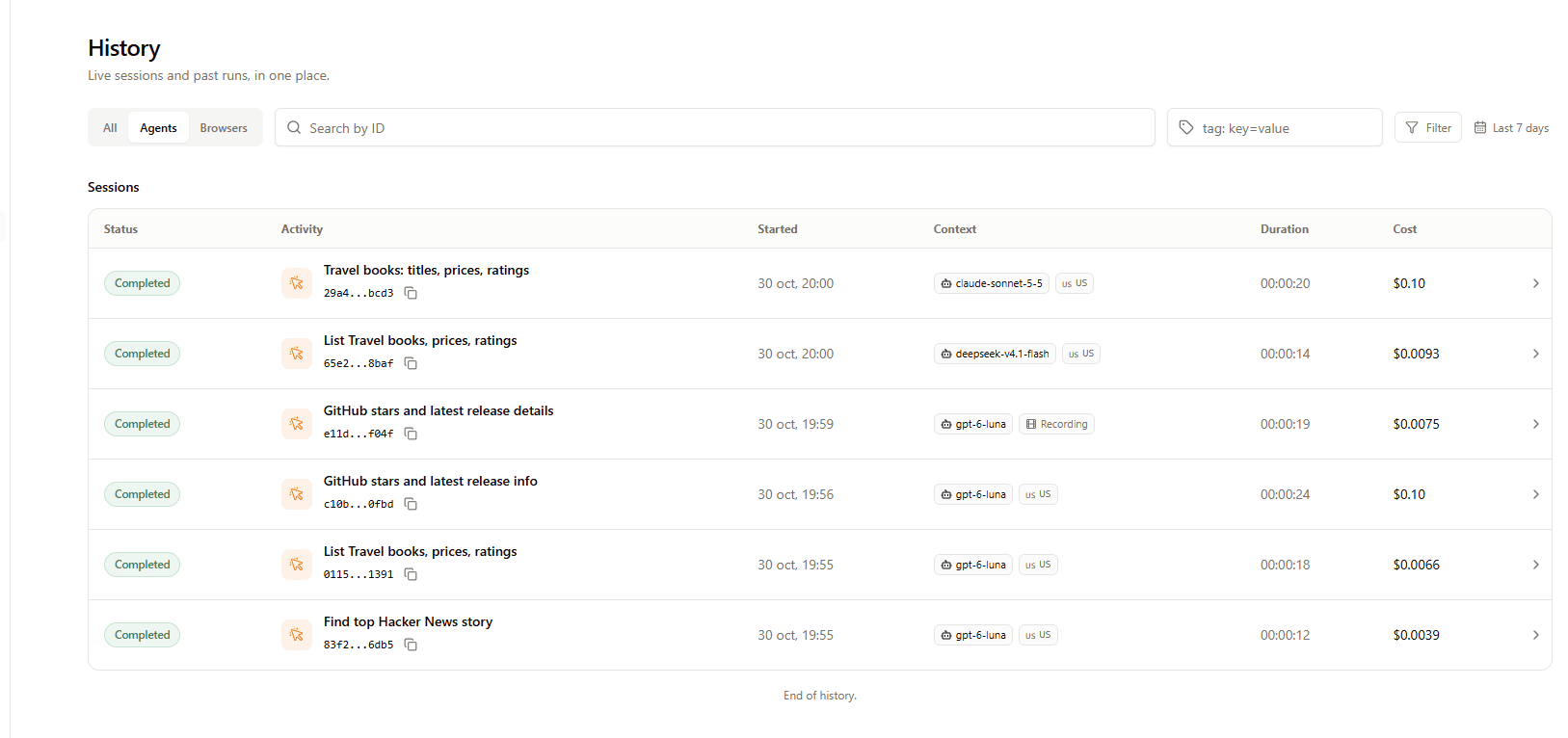
Every run also shows up in the dashboard's history, with the model, duration and cost of each session:
Looking for technical content that explains your API like this? I write hands-on, SEO-optimized articles for developer tools and infrastructure companies, built on real tests, not marketing fluff. → Let's talk on LinkedIn
Test 3: What a run actually costs
This is the part most reviews skip. Every run returns a cost breakdown through client.sessions.cost(session_id), so I pulled it for each task:
| Task | LLM | Browser | Proxy traffic | Total |
|---|---|---|---|---|
| Hacker News | $0.0025 | $0.0010 | $0.0003 | $0.0039 |
| Travel books | $0.0032 | $0.0010 | $0.0024 | $0.0066 |
| GitHub (residential proxy) | $0.0036 | $0.0010 | $0.0928 | $0.0974 |
| GitHub (no proxy) | $0.0035 | $0.0003 | $0.0037 | $0.0075 |
Two things stand out.
The model is the cheap part. Under half a cent of LLM per task. The browser itself is a rounding error.
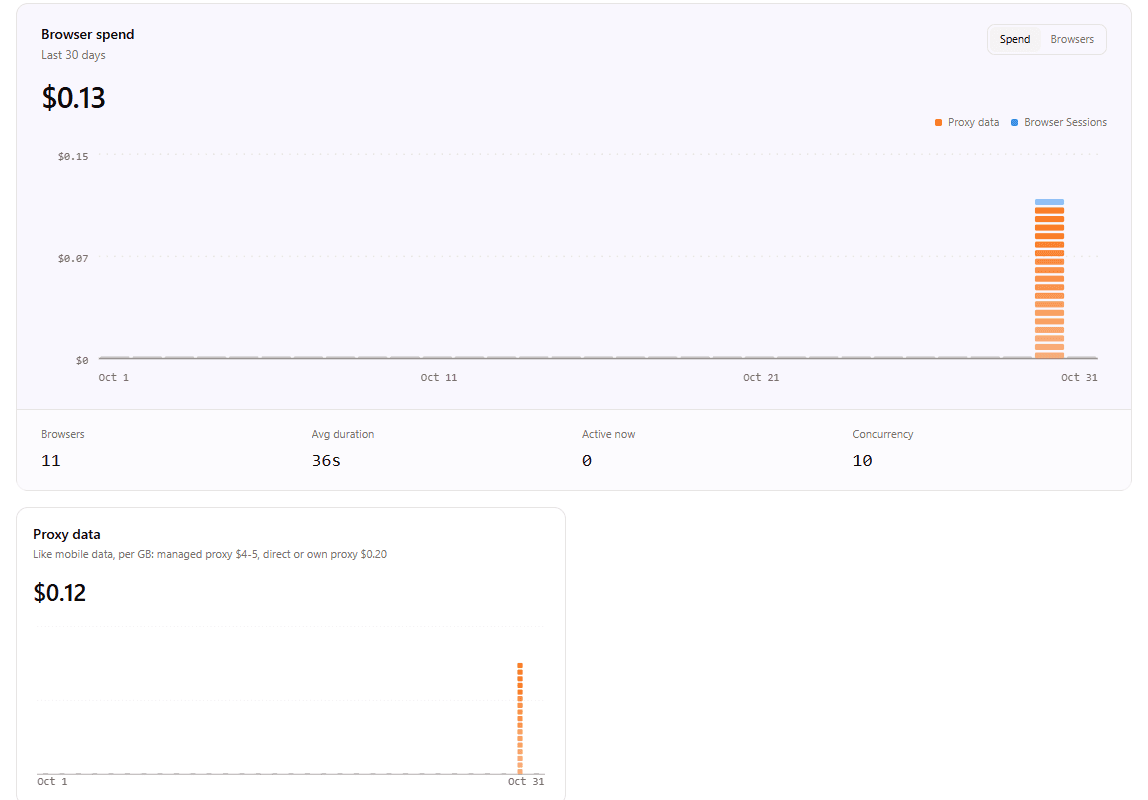
Proxy traffic is where the money goes. GitHub's page pulled about 19 MB through the residential proxy, and at $5/GB that was 95% of the bill. The usage dashboard shows the same pattern across all my tests: $0.12 of the $0.13 browser spend was proxy data.
The same task with the proxy turned off (direct traffic is billed at $0.20/GB instead of $5/GB) cost 13x less and returned the same answer:
run = client.runs.create(
    task,
    browser_settings={"proxy_country_code": None},  # direct connection, no residential proxy
)
The rule I'd follow: keep the residential proxy for sites that actually block you, and turn it off for public pages like GitHub, docs or your own app.
One more practical tip. An agent's browser stays open for about two minutes after the run (that's the default keepAlive), and while it's open, the session cost shows a provisional figure. In my runs it read $0.08, exactly four hours at $0.02, the browser's maximum lifetime. Once the browser closed, it settled to $0.001. If you track costs programmatically, read them after the browser stops, or stop it yourself:
summary = client.runs.wait_for_completion(run.id)
# ... later, once the browser has stopped:
cost = client.sessions.cost(summary.session_id)
print(cost.llm_cost_usd, cost.browser_cost_usd, cost.proxy_cost_usd, cost.total_cost_usd)
All in, this whole review (11 standalone cloud browsers and 10 agent runs) cost about $0.27 of credit.
Browser Use review: what I liked, and what to watch
Pros
- The stealth difference is visible from the first test: "Robot" locally, "Normal" in the cloud, without touching a single stealth plugin
- Cold starts under a second in all 10 tries, including 5 in parallel
- Hosted agents with a JSON schema returned exact, structured data on every task I checked
- Browser Use's own models were the fastest (
bu-ultrafast) and cheapest (bu-fast) options I tested, with no loss in accuracy - Transparent per-session cost breakdown (LLM, browser, proxy) through the API
Cons
- Residential proxy traffic dominates the bill on heavy pages; you need to decide per task whether you need it
- Session costs show a provisional four-hour figure until the browser stops, which can be confusing if you read it immediately
- Selenium can't connect to the CDP endpoint; you need Playwright or Puppeteer
Best for: teams building AI agents that need to browse real websites reliably, whether you want to keep your own Playwright code or hand the whole task to a hosted agent.
Key takeaways
- Getting through: the cloud browser passed the bot checks that local headless Chromium failed, out of the box.
- Finishing the task: the hosted agent got 3 out of 3 verifiable tasks right, including 11/11 structured records, in 7–24 seconds depending on the model.
- Cost: a typical run cost under one cent. Watch proxy traffic, not the model.
The hard part of browser automation was never writing page.click().
It was everything around it. That's the part Browser Use takes off your plate.
FAQs
❓ Is Browser Use free?
✅ The open-source browser-use library is free and MIT-licensed. Browser Use Cloud is pay-as-you-go with no subscription: new accounts get $1 of free credit, and after that you pay $0.02 per browser hour, $5/GB of residential proxy traffic, and model tokens plus 20% for agent runs.
❓ Can I use Browser Use Cloud with Playwright?
✅ Yes. Create a browser with the SDK, then call p.chromium.connect_over_cdp(session.cdp_url). Your existing Playwright code runs unchanged. Puppeteer works the same way; Selenium doesn't support remote CDP URLs.
❓ How much does a Browser Use agent run cost? ✅ In my tests, between $0.004 and $0.01 per task with the default model, and about $0.10 when a heavy page went through the residential proxy. The model cost was under half a cent per task.
❓ What are bu-fast and bu-ultrafast?
✅ Browser Use's own agent models, available on every US plan since November 1, 2026. bu-ultrafast runs on a priority inference tier for the lowest latency; bu-fast is the same agent at standard rates. In my tests both got 11/11 on a structured extraction task, bu-ultrafast was the fastest model on every task, and bu-fast was the cheapest at $0.0013 of model cost.
❓ What's the difference between Browser Use and Browser Use Cloud?
✅ browser-use is the open-source Python agent you run yourself with your own browser and LLM key. Browser Use Cloud adds managed stealth browsers, residential proxies, CAPTCHA handling and hosted agents behind an API.
Building a developer tool in this space? I create hands-on, SEO-optimized content like this review for API and infrastructure companies. If that's useful for your product, let's talk. → Connect with me on LinkedIn
More technical writing and projects: → kevinmeneses.com