← Back to articles
Best 5 Browser Automation API for AI Agents in 2026
Originally published on medium.com
Web BrowserBrowser AutomationAIAi Agents In ActionAPI
Every team building browser automation hits the same fork in the road. Manage headless Chrome yourself, or hand the whole problem to an API.
Browserless.io built this category. It turned “run a headless browser at scale” from a DevOps project into a single endpoint.
The question worth asking in 2026 isn’t whether Browserless works. It’s what actually competes with it, and when one of those alternatives fits your stack better.
If you’re:
- scraping data at scale,
- running AI agents that need to browse the web,
- or automating screenshots, PDFs, and testing pipelines,
this comparison is for you.
What a Managed Headless Browser API Actually Needs to Solve
A “headless browser API” sounds simple on paper. Send a URL, get back HTML, a screenshot, or a PDF.
In production, the real problems show up fast:
- Browsers crash and leak memory under load
- Websites detect and block automated traffic
- CAPTCHAs interrupt otherwise working scripts
- Sessions need to be debugged when an agent silently fails
- Scaling from 10 to 10,000 concurrent sessions breaks naive setups
Every vendor in this space is really selling the same thing: someone else managing that complexity so you don’t have to.
The Real Differentiator Isn’t the Feature List
Most comparison articles line up checkboxes. Stealth mode, yes or no. CAPTCHA solving, yes or no. Proxy rotation, yes or no.
That’s not where these tools actually diverge.
The real differentiator is production reliability, plus how a vendor responds when something breaks at 2am on a Sunday. A landing page can promise stealth browsing. It can’t promise someone will answer your support ticket in twenty minutes.
That’s the lens for this comparison.
5 Headless Browser APIs Worth Evaluating in 2026
1. Browserless.io
Browserless.io provides managed headless browser infrastructure built specifically for developers and engineering teams.
Its core offerings are BrowserQL (a stealth-first query language for bot bypass and structured data extraction), Browsers as a Service (a pooled cloud of Chromium, Firefox, and WebKit instances compatible with Puppeteer and Playwright), and straightforward REST APIs for screenshots, PDFs, and scraping. It also solves CAPTCHAs automatically, including reCAPTCHA, hCaptcha, and Cloudflare Turnstile.
The platform abstracts away browser lifecycle management: version updates, memory leaks, scaling, and detection avoidance become one API endpoint instead of a maintenance burden.
Pros
- BrowserQL gives you stealth and structured extraction without hand-rolling anti-detection logic
- Supports Puppeteer, Playwright, and Selenium with a one-line connection change
- Self-hosting is available (through providers like Sliplane) if you want fixed infrastructure costs instead of per-unit billing
Cons
- Paid plans range from $25/month (Prototyping) up to $350/month (Scale), and cost can climb quickly with concurrency
- The free tier caps out at 1,000 units/month, which disappears fast in a real scraping job
Best for: teams that need full headless browser control (Puppeteer or Playwright scripts, PDF generation, multi-page navigation flows) without building that infrastructure themselves.
Looking for technical content that explains your API like this?
I write educational, SEO-optimized articles for developer tools and infrastructure companies, not marketing fluff.
→ Let’s talk on LinkedIn
2. Hyperbrowser.ai
Hyperbrowser.ai positions itself as internet infrastructure built specifically for AI agents rather than general-purpose scraping.
It provides instant, scalable browser infrastructure with built-in CAPTCHA solving, proxy management, and anti-bot detection, plus HyperAgent, an AI-native automation framework that layers natural language commands (page.ai(), page.extract()) on top of standard Playwright.
Pros
- Built around agent workflows from day one, not scraping retrofitted for agents
- Falls back to regular Playwright when you don’t need the AI layer, so you’re not locked into one paradigm
- Backed by Y Combinator, Accel, and SV Angel, with active engineering hiring
Cons
- Small team (4 employees as of 2026), which means less dedicated support bandwidth than a larger vendor
- Younger platform with a smaller track record at large scale compared to Browserless
Best for: teams building AI agents that need to browse and extract data using natural language instructions instead of brittle selector-based scripts.
3. Steel.dev
Steel.dev is an open-source browser API purpose-built for AI agents, with a clear focus on speed and observability.
Its published lifecycle benchmark shows Steel completing a create-connect-navigate-release cycle in an average of 0.89 seconds, which the team reports as 1.70x to 8.95x faster than other providers tested under the same conditions. It adds live session viewers, MP4 replays, and Agent Logs, a timeline of every click, navigation, and scroll an agent takes.
Pros
- Open source, so you can self-host and audit exactly what’s running
- Agent Logs and session replay make debugging failed automation runs far less painful
- Fast session starts matter directly for agent workloads that spin up and tear down browsers repeatedly
Cons
- Early-stage company; smaller team and less enterprise track record than Browserless
- Fewer built-in integrations outside the core Puppeteer/Playwright/Selenium compatibility layer
Best for: teams that want an open-source, self-hostable browser API and care about debugging tools as much as raw automation.
4. Surfsky.io
Surfsky.io is built around one specific problem: bypassing advanced anti-bot systems that block most standard headless browser setups.
It targets CAPTCHA, WAF, and bot-detection bypass as its primary differentiator, positioning itself directly against Browserbase and ZenRows on bypass reliability rather than general feature parity. The platform offers an API-first architecture designed to integrate with existing automation frameworks.
Pros
- Purpose-built for the hardest scraping targets: sites with aggressive anti-bot protection
- Cloud-based infrastructure designed for scale without manual proxy management
- API-first design means less glue code to plug it into an existing pipeline
Cons
- Narrower focus than Browserless. Less useful if PDF generation, screenshots, or general testing automation are your primary use case
- Smaller, less established brand compared to the other tools on this list
Best for: teams whose main blocker is bypassing sophisticated bot detection on specific high-value targets, not general-purpose browser automation.
5. Gaffa
Gaffa is a lightweight API for web scraping and browser automation aimed at developers who want one API call instead of managing browser infrastructure.
It handles residential proxies, scaling, and failure recovery internally, and supports actions like scrolling, clicking, and extracting page data as images, Markdown, HTML, or LLM-structured JSON. Credits are charged for actual browser execution time and bandwidth, with no fixed infrastructure costs.
Pros
- Simple, single-endpoint design with low setup overhead
- Native output as clean Markdown or JSON, useful for feeding LLM and RAG pipelines directly
- Pay-for-usage pricing with no fixed infrastructure fees
Cons
- Indie, early-stage project with a very small team, so support and roadmap velocity are unproven at scale
- Fewer public case studies or production references compared to established vendors
Best for: solo developers or small teams that want a minimal, low-overhead scraping and automation API without evaluating a full enterprise platform.
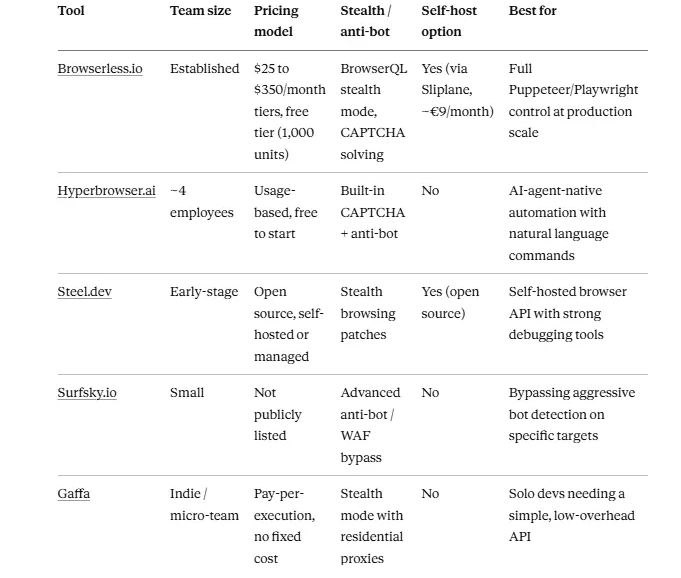
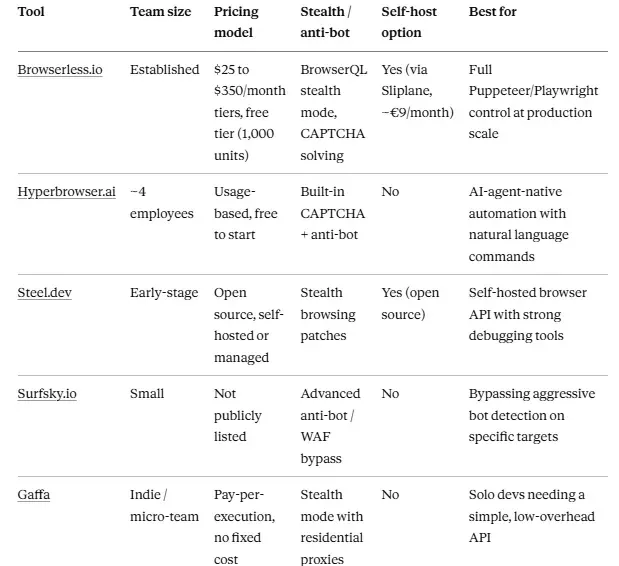
Headless Browser API Comparison Table
Key Takeaways
- Browserless.io remains the safest default pick if you need full browser control (Puppeteer, Playwright, PDF generation) at production scale, backed by a mature platform and a self-hosting path.
- If your workload is AI-agent-specific, Hyperbrowser.ai and Steel.dev are worth testing for their agent-native tooling and debugging features.
- If bot detection bypass is your single hardest problem, Surfsky.io is a narrower but more targeted option than a general-purpose platform.
The smaller vendors on this list (Hyperbrowser, Steel.dev, Surfsky.io, Gaffa) can move faster on support and roadmap requests precisely because they’re small. That’s a real advantage, but it comes with less production history than Browserless.io has built over time.
For most teams evaluating a headless browser API in 2026, that trade-off, and not the feature list, is the decision that actually matters.
Building a developer tool in this space?
I create technical, SEO-optimized content like this comparison for API and infrastructure companies. If that’s useful for your product, let’s talk.
→ Connect with me on LinkedInMore technical writing and projects:
→ kevinmeneses.com
Looking for technical content for your company? I can help — LinkedIn · kevinmenesesgonzalez@gmail.com