Claude Code Best Practices I Learned Fixing 86 Broken Pages
Claude CodeSEOWeb DevelopmentAi Tools
AI can build a website in an afternoon.
It can't tell you the website is quietly broken. Unless you ask the right way.
Last week I sat down with Claude Code to "polish" my personal site, kevinmeneses.com. A few logos, some animation, maybe a new section. By the end of the day I had four new landing pages, a mobile menu that didn't exist before, and a list of problems I had no idea I had:
86 pages Google was excluding as broken
a full duplicate of my site living on www
zero contact requests measured in 90 days of analytics
None of that was visible from the browser. All of it was visible to Claude once it was connected to the right tools.
Search Console: 86 pages excluded by a noindex tag, and growing every week.
If you're:
learning how to use Claude Code on a real website,
vibe coding a website for your business or your clients,
or building an AI website builder yourself,
these are the 11 Claude Code best practices that mattered most, in order of importance. Not generic Claude Code tips: lessons from one real rebuild. Each one comes with a prompt you can copy, and a note on what it means if you build website software for a living.
The setup (in one paragraph)
My site runs on a common modern stack: Next.js for the pages, Strapi as the blog CMS, Vercel for hosting. In one session, working only through conversation, Claude Code and I added animated sections and client logos, built four keyword-targeted service pages in two languages, added a mobile menu and FAQs, and connected Google Search Console and Google Analytics to fix what they revealed.
I didn't write the code. I did make every decision.
The new homepage hero: animated service orbit, built and verified in the same session.
1. Give Claude Code context before you give it work
The first thing Claude did was find my project and read a file called CLAUDE.md: plain-language notes about how the site is hosted, what breaks if you touch it, and how I publish articles.
That file saved hours. Claude knew the CMS deploys manually, that every English post needs a Spanish translation, and which old fix must never be reverted.
Related articles
Without context, a smart assistant becomes a fast stranger.
Try this prompt:
"Read this project and write a CLAUDE.md that explains the stack, where each part is hosted, how to run it locally, and anything that would be dangerous to change."
For builders: every generated site should ship with a living context file. The next person (or AI) to touch it will need it.
2. "Done" is not "verified": make it check in a real browser
Claude built a mobile menu. The code was clean and the build passed.
Then it opened the page in a real browser, tapped the menu, and saw the problem: the menu panel was transparent. A blur effect on the header was changing how the panel was positioned, so the links floated over the page with no background.
No automated check catches that. Only looking does.
Try this prompt:
"After each change, open the page in the browser, use it like a visitor would, take a screenshot and tell me what you see. Don't tell me it's done until you've checked."
For builders: visual verification should be a product feature, not a user habit.
3. Check mobile every single time
Two bugs only existed on a phone: a play button covering text in an animated section, and a revenue figure ("+$25,000") that wrapped onto two lines and looked broken.
Both looked perfect on desktop. Both took two minutes to fix once someone looked at a small screen.
Checked at 390 pixels wide: homepage and the LinkedIn ghostwriter landing.
Try this prompt:
"Check this page at 375 pixels wide. Look for anything cut off, overlapping, wrapping badly, or causing horizontal scroll."
For builders: test the smallest common screen by default, before your user ever sees the result.
4. You decide the copy, the numbers and the services
AI writes confident copy. Sometimes too confident.
While drafting my service pages, Claude listed "onboarding email sequences" as a deliverable. It sounded right. I don't sell it. To its credit, Claude flagged every claim it had added on its own and asked me to confirm. I removed what I don't offer, added what it couldn't know (I run a LinkedIn newsletter with 1,600+ subscribers), and made one revenue figure identical across the whole site.
A website that promises things you don't deliver is a liability.
Try this prompt:
"List every claim, number and service you wrote that didn't come from me, so I can confirm or remove each one."
For builders: mark AI-invented claims for human review. Never publish them silently.
5. Choose page keywords with real data, not intuition
My instinct for my YouTube service page was the phrase "YouTube content creation." About 1,600 searches a month in the US.
Then Claude pulled the real search results. The people searching that phrase are creators learning to make videos. Not companies hiring someone.
Meanwhile, "LinkedIn ghostwriter" gets around 260 searches a month, has almost no competition, and the top results are exactly the kind of page I was building. I renamed my English LinkedIn page around it.
Small number. Right intent.
The page renamed around "LinkedIn ghostwriter" after checking real search data.
Try this prompt:
"Before building this page, check the search volume, difficulty and current Google results for these 5 phrases, and tell me which one my target client actually uses."
For builders: generate pages from search demand and intent, not just from whatever the user typed into a prompt.
6. Connect Claude Code to your real tools with MCP
This is the part most people haven't seen yet, so here it is without jargon.
Claude Code can be connected to other services through MCP (Model Context Protocol). That's what people mean by "Claude Code MCP servers." Think of each connector as handing Claude a key to one of your tools, with your permission. In my session those keys were:
OpenSEO: keyword data, plus my Google Search Console and Google Analytics
My browser: to open pages, tap buttons and see what a visitor sees
Google Calendar: it booked a review reminder for next week
A scheduled task: it will re-check my SEO and analytics on its own in seven days
Without connectors, Claude only sees your code. With them, it sees how Google sees your site and how real visitors use it.
Every important finding in the rest of this article came from that.
Try this prompt:
"Using Search Console and Google Analytics, tell me the three biggest problems on my site right now, in plain language, and what each one is costing me."
For builders: integrations are the moat. A builder that reads its own site's search and analytics data will beat one that only generates pages.
7. Measure contacts, not just visitors
Here's the finding that changed how I think about my site.
Google Analytics had been running for three months. It counted visitors, pages and countries. In all that time it recorded zero contact requests.
Not because nobody contacted me. Because the site never told Analytics when someone did.
In shop terms: Analytics knew people walked in. It had no idea anyone asked for a quote.
So we added a small signal for each action that matters to the business: sending the contact form, clicking my email, clicking "Request a proposal" (with the price package), clicking an affiliate link, and opening an FAQ question. Then I marked "form sent" and "email clicked" as key events in Google Analytics. Now every report answers the only question that matters: which page brings clients?
Google Analytics realtime: the first email click recorded as a key event.
One detail most people miss: your own visits inflate the numbers. On my site, visiting any page once with ?notrack=1 tells that browser to stop counting me.
Try this prompt:
"Make sure Google Analytics records when someone sends the contact form or clicks my email, and give me a way to exclude my own visits."
For builders: conversion tracking should be on by default. A site that can't show its owner where leads come from will be replaced by one that can.
8. One domain, permanent redirects
Search Console is Google's free report card for your site. Claude read mine and found two silent problems:
Old article addresses redirected "temporarily." Google kept treating the old address as the real one and split my rankings between two versions of the same article. A permanent redirect tells Google to consolidate everything.
www.kevinmeneses.com was a full copy of my site. Instead of sending visitors to the main address, it served everything twice.
Both were one small configuration change. Both had been costing me for months.
You can check your own site with a few lines of Python:
import requests
URLS = [
    "https://www.kevinmeneses.com/es",
    "https://kevinmeneses.com/articles/5-skills-de-claude-code-para-trading-algoritmico",
]
for url in URLS:
    r = requests.get(url, allow_redirects=False, timeout=10)
    print(r.status_code, url, "->", r.headers.get("Location", ""))
308 means permanent. 307 is the temporary redirect you want to avoid for pages that have moved for good.
Try this prompt:
"Check whether my www and non-www domains both serve the site, and whether old URLs use permanent (308) or temporary (307) redirects."
For builders: one canonical domain and permanent redirects should be the default, not a setting buried three menus deep.
9. Test the language switcher on deep pages
This one surprised me most.
Search Console listed 86 pages as excluded from Google. They weren't real pages. They were addresses that should never exist: an English URL with a Spanish article name.
The cause was my language switcher. When a reader on a Spanish article clicked "EN," it kept the Spanish article name and only swapped the language. Readers landed on an empty "not found" page, and Google logged another broken URL every time.
The broken URLs: English paths with Spanish article names, and the other way around.
Now, when someone asks for an article in the wrong language, the site finds the translation and sends them there.
Try this prompt:
"Open an article, switch language with the site's own switcher, and tell me where I land. Do the same for every page type."
For builders: if you generate multilingual sites, test language switching on deep pages. That's where i18n bugs hide.
10. Test the production build, and suspect the cache
At one point a new animation simply didn't appear. The code was right. A standalone test of the styles worked.
The development server was serving an old, cached stylesheet. Deleting the cache fixed it instantly. The same thing happened with images: when we replaced three blurry client logos, browsers kept showing the old ones until the files got new names.
That's why, before every release, Claude ran a full production build and tested it locally. Some behaviors only exist in production.
Try this prompt:
"Before we publish, run a production build, start it locally and test the pages we changed. If something looks stale, clear the cache before debugging the code."
For builders: cache invalidation is still one of the hardest problems in software. Make it invisible to your users.
11. Review first, publish second
Claude never published anything on its own. Every change was built, tested and shown to me first. Only after I said "upload it" did it commit and deploy, then check the live site to confirm the change was really there.
That rhythm let me change direction safely. I cut a GitHub section I didn't like, refocused a whole section on founders' problems, and moved a video, all before any visitor saw the earlier versions.
The section I refocused on founders' problems before publishing.
Try this prompt:
"Don't publish anything until I approve it. When I do, deploy it and then check the live site to confirm the change is there."
For builders: a preview, an explicit approval and a post-publish check are what make users trust AI with a live website.
Claude Code best practices: key takeaways
Claude Code is fast at building. Its real value shows up when you ask it to verify: in the browser, on mobile and in production.
Connecting it to Search Console, Analytics and keyword data turned a design session into a business audit. That's where the costly problems were.
You still own the decisions: what you sell, what you claim, what you publish.
FAQs
❓ Can Claude Code build and edit a website?
✅ Yes. Claude Code can create pages, components and styles in a real project, run the site locally and test it in a browser. It works best on an existing project with clear context about how the site is built and deployed.
❓ How do you use Claude Code if you're not a developer?
✅ Not to direct it. I described changes in plain language and reviewed the results visually. Knowing the basics helps you judge trade-offs and spot answers that sound plausible but aren't what you want.
❓ Can Claude Code help with SEO?
✅ Yes, especially when connected to real data. With Search Console and keyword tools it found redirect problems, a duplicate domain and broken pages, and picked page keywords based on actual search volume and intent.
❓ What are Claude Code connectors (MCP)?
✅ Connectors use the Model Context Protocol to give Claude access to tools you approve, such as Google Search Console, Google Analytics, your calendar or your browser. They let Claude work with live data from your business instead of guessing.
Final thoughts
AI website builders made creating a website easy.
The next ones will make keeping it right easy: verified on every screen, visible to Google, and honest about what it sells and what it earns.
That's the product I'd want to use. And the story I'd want to tell.
Building an AI website builder, a Claude Code website builder or a no-code platform?
I write technical content that shows developers and founders what your product actually does, from hands-on tutorials to real-world case studies like this one.
→Work with me
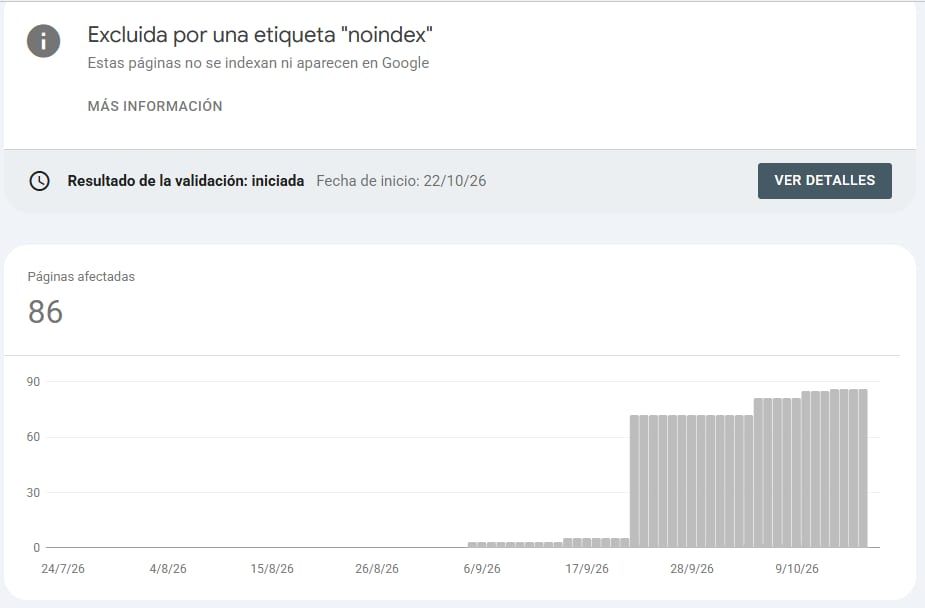 Search Console: 86 pages excluded by a noindex tag, and growing every week.
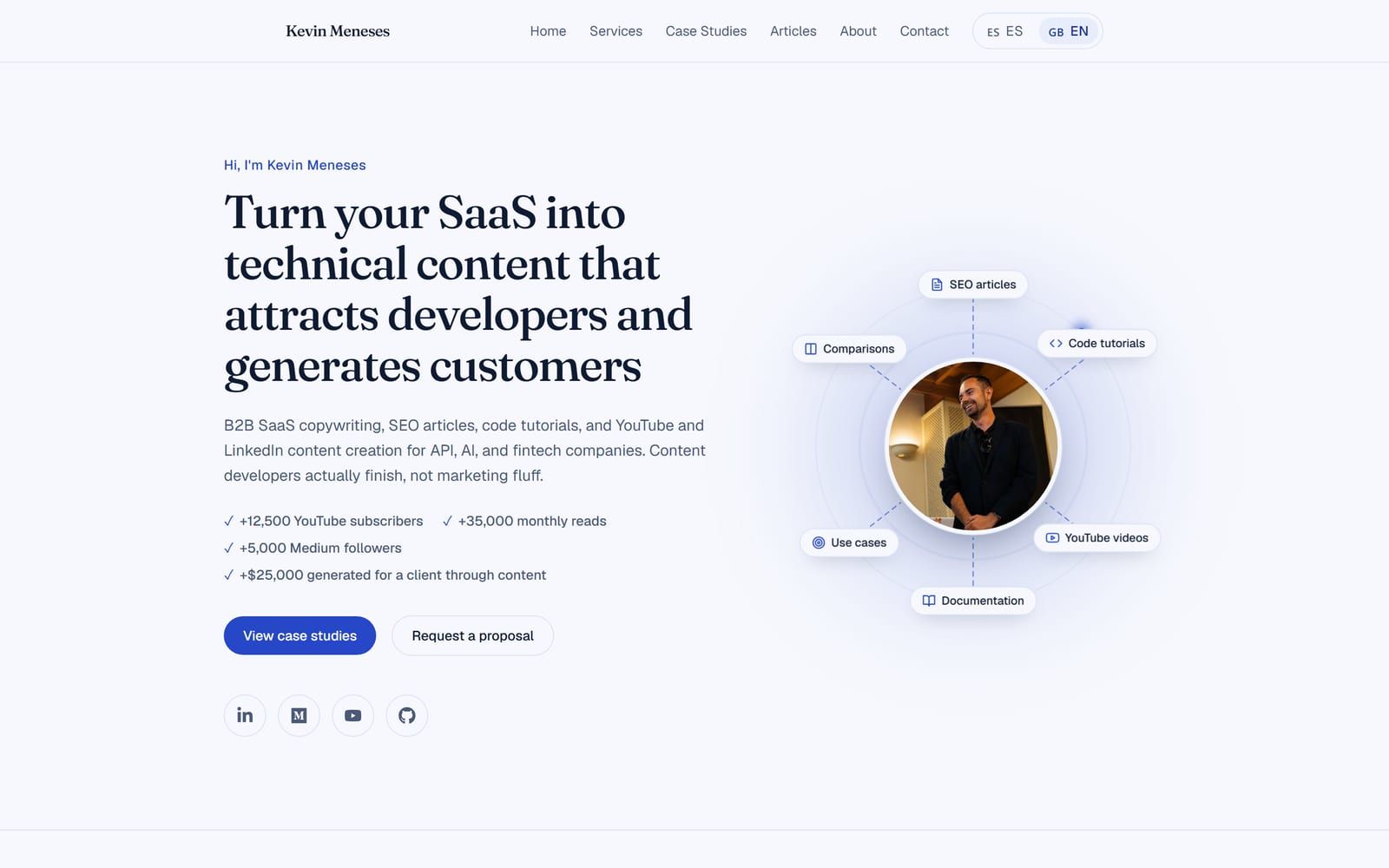 The new homepage hero: animated service orbit, built and verified in the same session.
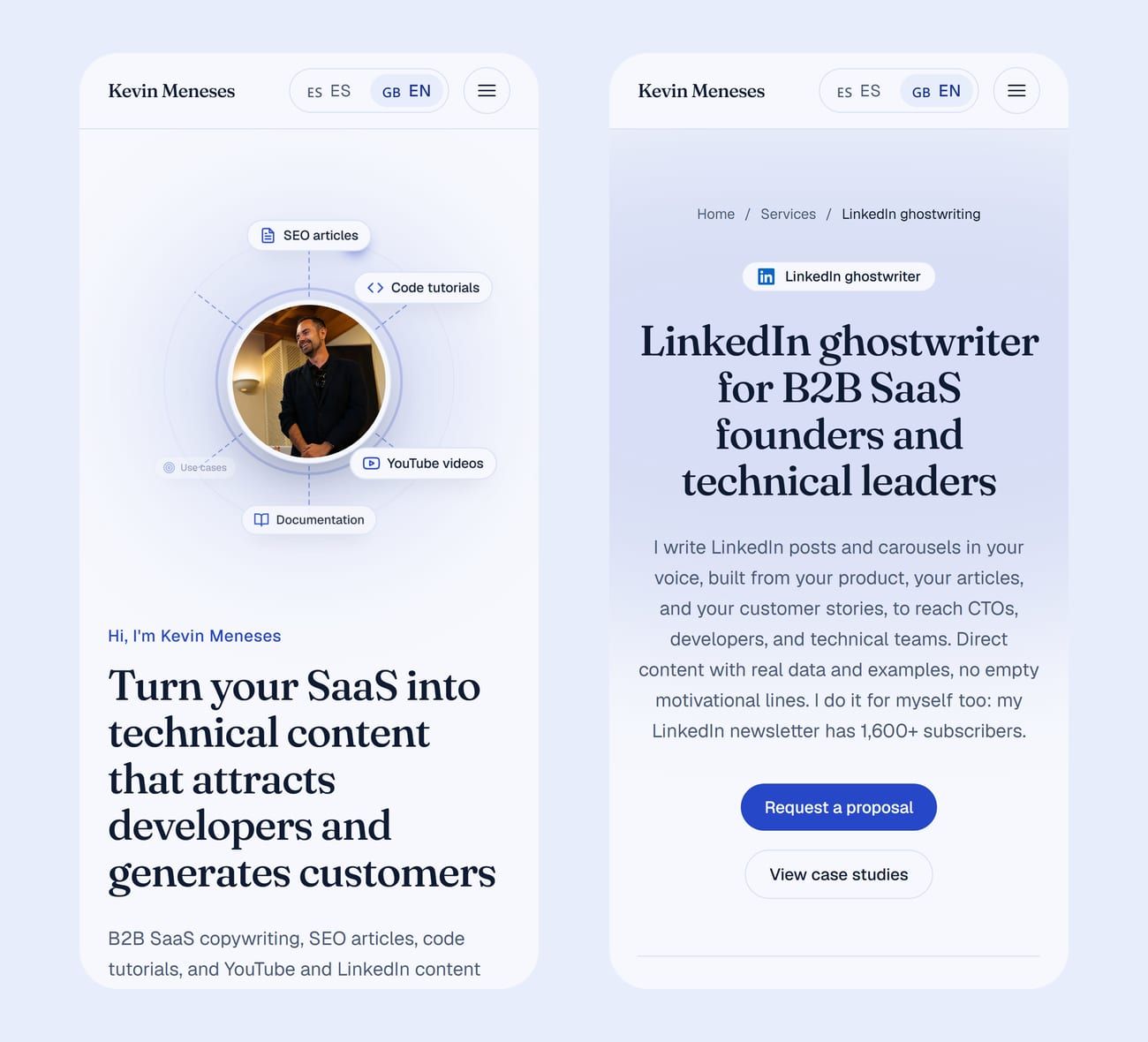 Checked at 390 pixels wide: homepage and the LinkedIn ghostwriter landing.
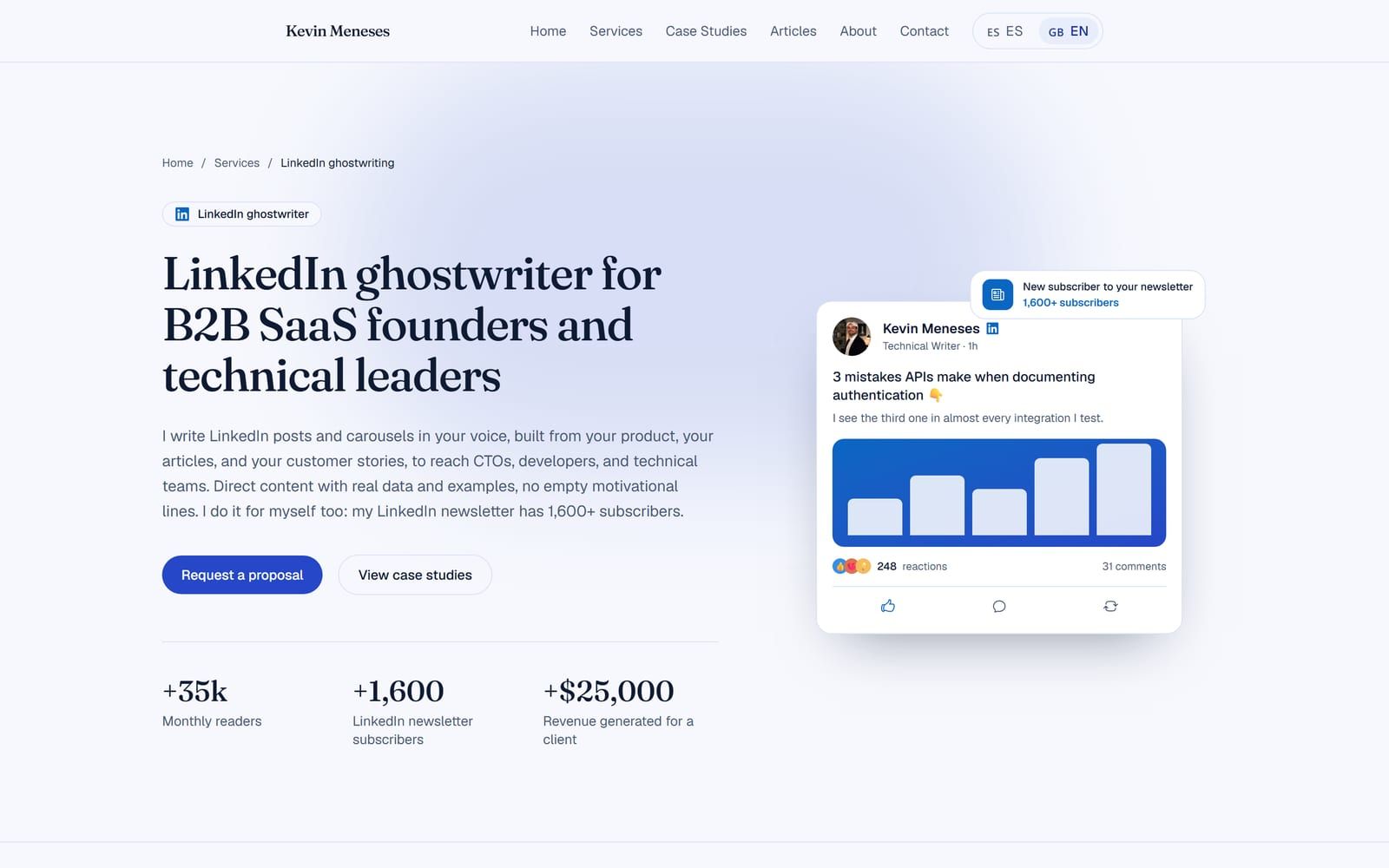 The page renamed around "LinkedIn ghostwriter" after checking real search data.
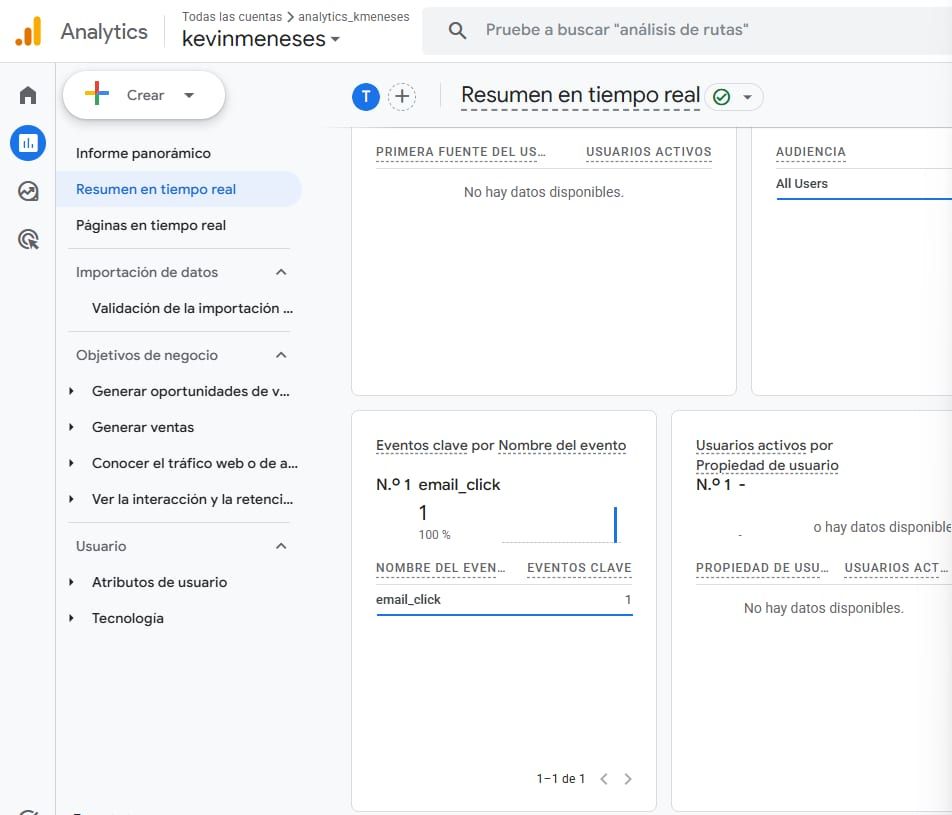 Google Analytics realtime: the first email click recorded as a key event.
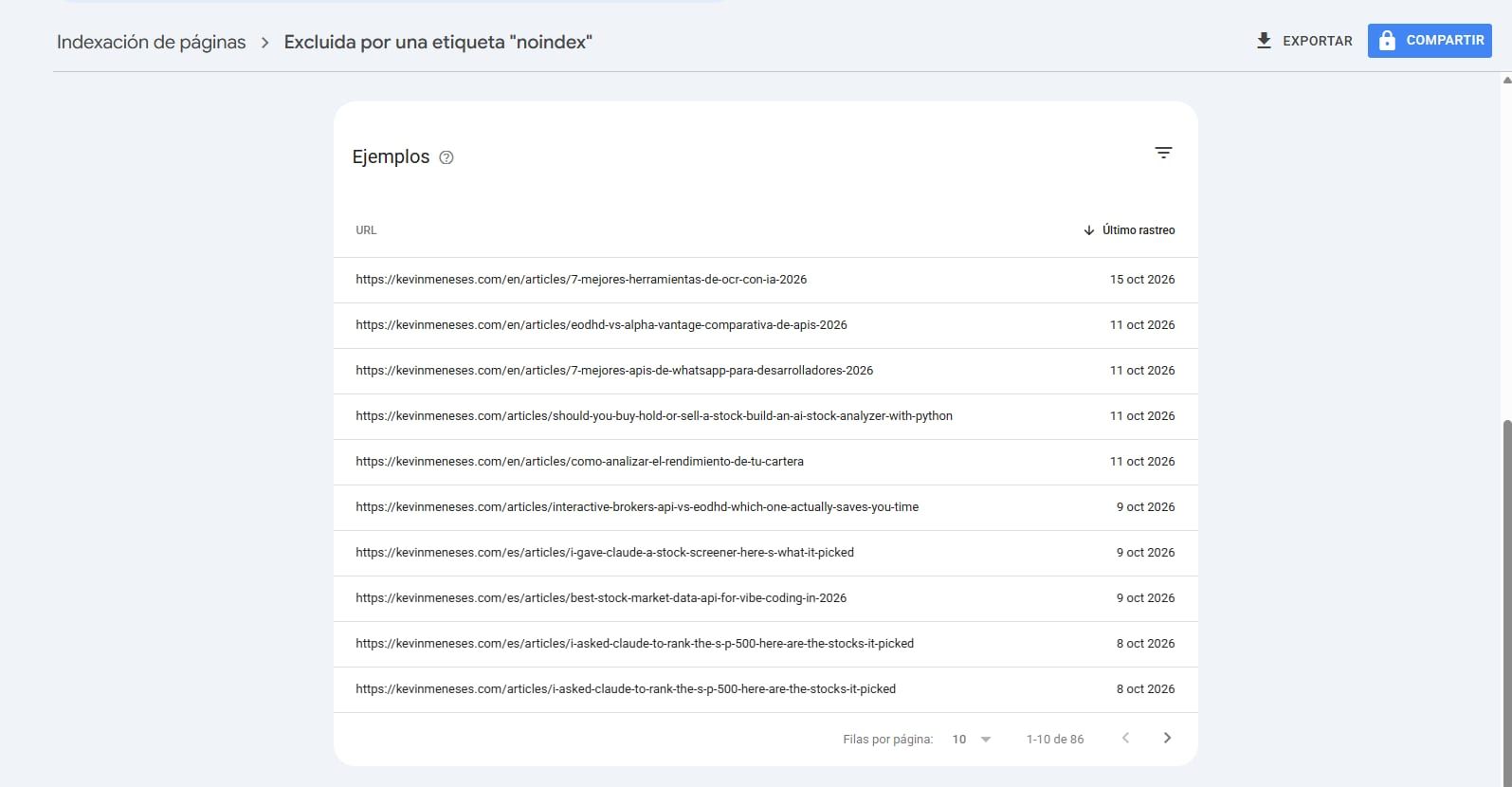 The broken URLs: English paths with Spanish article names, and the other way around.
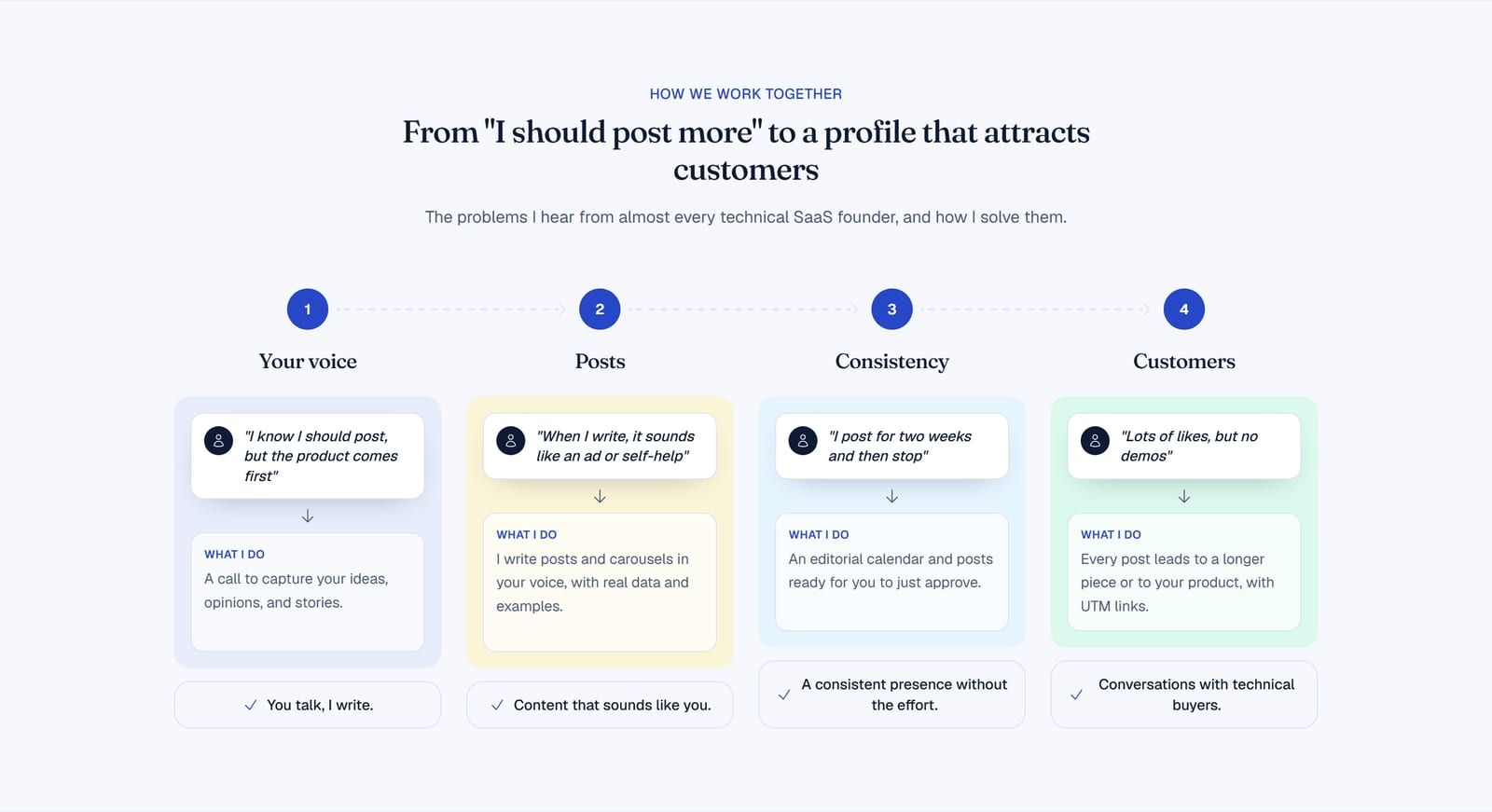 The section I refocused on founders' problems before publishing.