← Back to articles
7 Best AI Meeting Assistants for SaaS B2B Teams in 2026
Originally published on medium.com
Meetings aren’t the problem anymore.
The problem is everything that gets lost after the call ends. Decisions that never make it into the CRM. Follow-ups nobody executes. A customer objection that surfaces on a Tuesday call and disappears into a Zoom recording nobody rewatches.
In 2026, the AI meeting assistant market is mature. Every tool transcribes. Every tool summarizes. That’s table stakes now, not a differentiator.
If you're:
- running a sales team that lives in HubSpot or Salesforce,
- trying to close the loop between marketing, sales, and customer success,
- or building RevOps workflows that depend on clean, structured meeting data,
the tool you pick matters a lot more than the marketing pages make it look.
Most Comparisons Use the Wrong Filter
Search "best AI meeting assistant" and you'll find the same ten names ranked by transcription accuracy and UI polish. That's a consumer-productivity lens.
It's the wrong one for a SaaS B2B team.
A rep on a discovery call doesn't need a pretty summary. They need the tool to detect the objection, tag it, push it to the deal record, and trigger a follow-up sequence — without anyone touching the CRM manually.
A CS lead doesn't need "smart notes." They need churn signals surfaced automatically, across dozens of accounts, in a format their team can act on before renewal.
Judge these tools on that bar, and the ranking changes completely.
The real question isn't "which tool takes the best notes."
It's which tool turns a conversation into pipeline, coaching, and less manual CRM work.
How the Market Splits
Looking at pricing, CRM depth, API/MCP maturity, and security posture across seven platforms, three clear groups emerge.
Revenue-workflow tools — built around CRM sync, coaching, and deal execution: Avoma, Grain, Fireflies.ai.
Productivity-first tools — built for fast adoption and low friction: Fathom, Otter.ai, MeetGeek.
Context-layer tools — trying to go beyond the meeting itself, into email and search: Read AI.
Here's the full comparison before the breakdown.
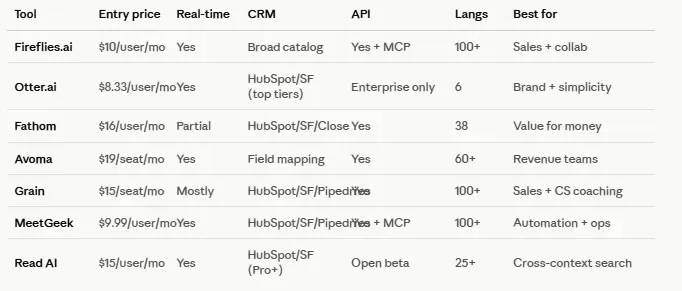
A few caveats worth flagging upfront: Avoma's own marketing pages disagree on language count (you'll see 40+, 60+, and 75+ depending on which page you land on) — treat it as "broad multilingual support," not a precise number. Fathom's real-time transcription depends on which product experience you're using. Read AI's MCP/API is explicitly in open beta.
The 7 Tools, One by One
1. Fireflies.ai — the balanced generalist
Fireflies covers the widest ground of any tool on this list: transcription in 100+ languages, real-time notes, automatic summaries, a searchable knowledge base (AskFred), a public API, an MCP server, and webhooks. Its CRM catalog is genuinely broad — HubSpot and Salesforce, but also Affinity, Pipedrive, Dynamics, and Zoho.
Pricing runs Free → Pro at $10/user/mo annual ($18 monthly) → Business at $19 annual ($29 monthly) → Enterprise at $39 annual. Security covers SOC 2 Type II and GDPR, with HIPAA and custom retention on Enterprise.
Pros
- Widest CRM integration catalog of the group
- MCP server and public API already mature, not an afterthought
- Aggressive entry pricing for the feature depth on offer
Cons
- Broad scope means it doesn't feel as specialized in pure revenue workflows as Avoma or Grain
Best for: teams that want one tool to serve sales, CS, and internal collaboration without buying three separate products.
2. Otter.ai — the familiar name
Otter is probably the most recognized brand on this list, and that recognition still counts for something in a buying committee. It covers real-time transcription, an AI chat layer over meetings, automated summaries, speaker identification, and CRM integrations with HubSpot and Salesforce on paid tiers, plus an MCP server that now shows up directly in its pricing and integrations pages.
Pricing: Basic (free), Pro from $8.33/user/mo annual, Business from $19.99/user/mo annual, Enterprise on demand.
The catch: documented language support tops out at English, Spanish, French, German, Japanese, and Simplified Chinese — noticeably behind Fireflies, MeetGeek, or Grain. API and webhooks are also more clearly gated behind Enterprise here than with most competitors.
Pros
- Strong brand recognition, easy internal buy-in
- Genuinely plug-and-play onboarding
Cons
- Language coverage is thin for a global or European team
- API/webhook access leans heavily on the Enterprise tier
Best for: organizations that value simplicity and brand trust over multilingual depth or deep automation.
3. Fathom — the value-for-money pick
Fathom moved fast from "the free option people liked" to a genuinely serious tool for commercial teams. Unlimited recording and transcription on the free tier, AI summaries, action items, auto-generated follow-up emails, CRM sync, a conversational assistant, a public API, webhooks, and MCP support for Claude and ChatGPT. It supports 38 languages.
Pricing: Free → Premium at $16/user/mo annual ($20 monthly) → Team at $15/user/mo annual, 2-user minimum ($19 monthly) → Business at $25/user/mo annual ($34 monthly) → Enterprise on demand.
One nuance worth calling out clearly: real-time live summary only exists in Fathom's new bot-free experience, initially rolled out for Mac and English-language meetings. The older bot-based experience doesn't have it. If real-time is a hard requirement for your buyer, this detail changes the answer.
Pros
- Best price-to-feature ratio in the group
- Growth Partner Program aimed directly at agencies and consultants
Cons
- Some advanced capabilities, including full real-time transcription, still depend on the newer product experience
Best for: teams prioritizing fast adoption and clear ROI over maximum feature depth.
4. Avoma — built for revenue teams
Avoma's pitch isn't "better notes." It's turning conversations into commercial execution: real-time transcription, AI notes with templates, smart chapters, follow-up emails, automatic CRM data entry, an internal Q&A assistant (Ask Avoma), coaching, scorecards, deal trackers, revenue intelligence, and lead routing — all inside one suite.
Pricing structure: a base AI Meeting Assistant plan (Startup at $19/seat/mo annual, $29 monthly; Organization at $29 annual, $39 monthly; Enterprise at $39 annual), plus add-ons for Conversation Intelligence and Revenue Intelligence at $29/seat/mo, and Lead Router at $19. There's a 14-day trial on the Organization plan with add-ons enabled, no card required.
Security covers SOC 2 Type II, GDPR, HIPAA, and additional enterprise controls. Avoma also runs a public referral program with a 10% first-year commission.
Pros
- Deepest CRM field-mapping and revenue workflow depth on this list
- Strong fit for structured sales methodologies (MEDDIC-style processes)
Cons
- Can be more platform than a team needs if all they want is meeting summaries
Best for: SaaS B2B revenue teams ready to instrument full sales and CS workflows, not just record calls.
5. Grain — coaching plus CRM speed
Grain leans into a narrower but sharp use case: transcription in 100+ languages, AI notes, action items, shareable clips, coaching, CRM sync, and meeting-to-agent connectivity through MCP. It's less "all-in-one suite" than Avoma, and more agile.
Pricing: Free plan (one Notetaker, 45-minute meeting cap) → Starter at $15/seat/mo → Business at $29/seat/mo → Enterprise on request. Personal API access starts at Starter; Workspace API and stronger webhooks are Business/Enterprise features. CRM integration is strongest with HubSpot, with Salesforce and Pipedrive also documented.
Pros
- One of the more interesting MCP/agent stories in this group
- Coaching features feel purpose-built for CS and sales enablement, not bolted on
Cons
- Pricing and packaging details are scattered across marketing pages, release notes, and support docs rather than one clean source
Best for: sales and CS teams that want speed and coaching without deploying a heavier full suite.
6. MeetGeek — the underrated automation play
MeetGeek is probably the most underrated tool in this comparison. Real-time transcription, live summaries and action items, 100+ languages, a public API, individual and team webhooks, MCP support (both cloud-hosted and self-hosted), CRM integrations, templates, agentic workflows, and active partnership programs.
Pricing: Basic (free, 3 hours/month) → Pro at $9.99/user/mo (20 hours/month) → Business at $17/user/mo (unlimited) → Enterprise on request. Security covers SOC 2 Type II, GDPR, HIPAA, and CCPA, with EU/US hosting options.
Pros
- Strong automation depth for the price point
- Public affiliate, reseller, creator, and technology partner programs — genuinely built for an ecosystem
Cons
- Less brand recognition than Otter or Fireflies, so it needs more explaining internally
Best for: consultants, agencies, and ops-heavy teams that want automation without paying enterprise pricing for it.
7. Read AI — meetings as one piece of a bigger context layer
Read AI plays a different game. It wants to be a copilot across meetings, email, and messaging — not just a meeting assistant. That makes it less "pure" as a notetaker, and more interesting for knowledge work where context is scattered across tools.
On the meeting side: live notes and metrics, summaries, transcript enhancement, playback, highlights, premium integrations, a REST API, and a remote MCP server compatible with both ChatGPT and Claude.
Pricing: Free (5 meeting transcripts/month) → Pro at $15/user/mo annual ($19.75 monthly) → Enterprise at $22.50 annual ($29.75 monthly) → Enterprise+ at $29.75 annual ($39.75 monthly), 5-license minimum. Pro already includes Notion, Salesforce, HubSpot, Jira, Confluence, Zapier, and webhooks. Enterprise+ adds HIPAA, SAML/SCIM, and custom retention. Language support covers 25+ for meeting reports.
Pros
- Genuinely different value proposition: context recovery across tools, not just meeting notes
- Fastest-growing integration surface for cross-tool workflows
Cons
- If your only goal is "the best sales meeting assistant," more focused tools do that job more directly
Best for: teams whose real problem is fragmented context between meetings, email, and chat — not just note-taking.
Looking for content that actually explains your product to developers?
I write technical articles and comparisons like this one for API and SaaS companies — not marketing fluff.
→ See more of my work
So Which One Should You Actually Pick?
If you're a SaaS B2B company with a clear commercial motion, here's how it breaks down by priority.
Revenue workflows and CRM depth: Avoma. Full stop, if your team is ready to instrument the workflow, not just record it.
Balance of breadth, language coverage, and cost: Fireflies.ai.
Coaching and speed inside HubSpot/Salesforce, without a heavier suite: Grain.
Fast adoption and best ROI: Fathom.
Automation, partnerships, and agency/ops use cases: MeetGeek.
Fragmented context across meetings, email, and chat: Read AI.
Brand simplicity and generalist use in a handful of languages: Otter.ai.
Key Takeaways
- Every tool transcribes well in 2026 — the real differentiator is CRM depth, API/MCP maturity, and how cleanly data flows into your existing revenue stack.
- "Best AI meeting assistant" depends entirely on which team is asking: sales, CS, and ops have different non-negotiables.
- Watch for vendor-reported numbers that shift by page (language counts, real-time support) — verify against official docs before you build a business case around them.
FAQs
❓ What's the best AI meeting assistant for a sales team?
✅ Avoma and Grain are built specifically around revenue workflows — CRM auto-fill, coaching, and deal tracking. Fireflies.ai is a strong alternative if you also need broader cross-team use beyond sales.
❓ Which AI meeting assistant has the best free plan?
✅ Fathom offers unlimited recording and transcription on its free tier, which is unusually generous. Fireflies and MeetGeek also have workable free tiers for light use.
❓ Do these tools support MCP for connecting to Claude or ChatGPT?
✅ Fireflies, Fathom, MeetGeek, Grain, and Read AI all offer some form of MCP server support. Read AI's is explicitly labeled open beta, so expect some rough edges if you're building on it today.
❓ Which tool has the widest language support?
✅ Fireflies, Grain, and MeetGeek all advertise 100+ languages. Avoma's documentation is inconsistent (ranging from 40+ to 75+ across different pages), so verify directly with sales if multilingual coverage is a hard requirement.
Looking for technical content for your company? I can help — LinkedIn · kevinmenesesgonzalez@gmail.com